Post-Migration Results
Production results after moving preview user search to Phoenix Search
Post-Migration Results
This page captures the production outcome after moving preview user detail search onto Phoenix Search and the user_details Elasticsearch projection.
The screenshots capture the production IN dashboard and API debugging views used for this Phase 1 result note.
Outcome Summary
| Area | Before | After |
|---|---|---|
| Search fan-out | Preview user detail search required roughly 6-7 backend/search lookups per search | Phoenix Search serves the search through one ES search request after session/scope resolution |
| Identifier lookup | Separate paths for LRF / lab-report identifiers, manual sample ID, bill ID, order number, and patient identity | Same identifiers are denormalized into user_details and queried through one mapped ES document |
| Search mapping | Legacy lookup-specific calls | Analyzer-backed ES mapping with exact, prefix, suffix, segment, and search_as_you_type fields |
| Index storage | Old userdetails index: 257.3 GB total, 129.2 GB primary | New user_details index: 135.75 GB total, 67.61 GB primary |
| Storage reduction | - | About 47% lower total storage, roughly 50% in practical terms |
| ES query latency | Multiple lookups per search made end-to-end latency harder to reason about | ES p50 about 2.5 ms, p95 about 4.75 ms, p99 about 4.95 ms in the saved dashboard window |
| Operational visibility | Harder to connect request, query, and CDC freshness | OpenTelemetry connects API, ES, MySQL, CDC, logs, and dashboards |
The important migration result is not only raw latency. The bigger win is that the search path is simpler: one shaped ES query over a purpose-built document instead of several lookup calls that each need their own timeout, error handling, and result merge behavior.
Storage Result
The old cluster data shared for the legacy index:
userdetails
3 primaries / 1 replica
157,661,460 documents
257.3 GB total
129.2 GB primary
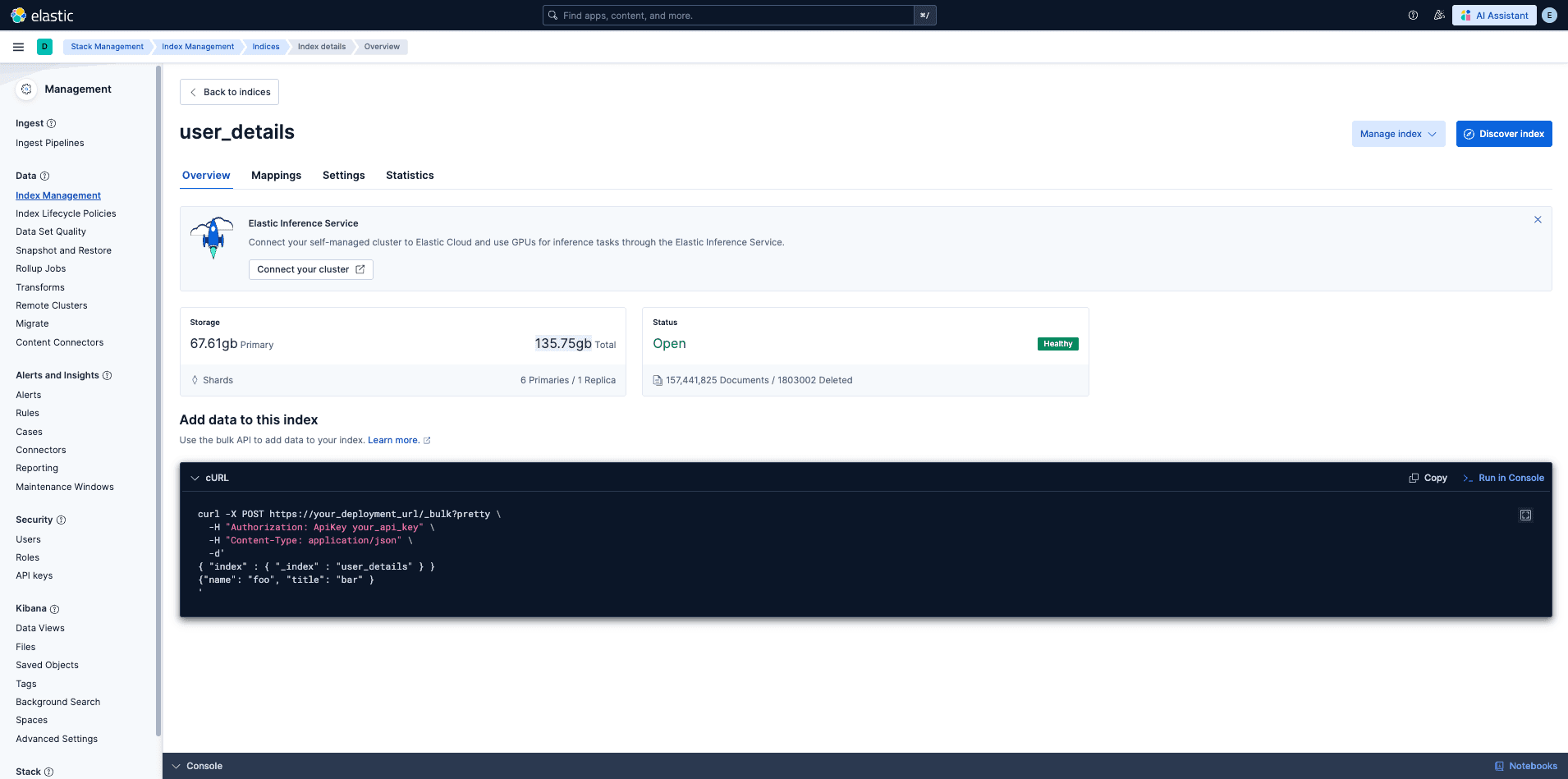
The new production index screenshot shows:
user_details
6 primaries / 1 replica
157,441,825 documents
135.75 GB total
67.61 GB primary| Metric | Old userdetails | New user_details | Change |
|---|---|---|---|
| Primary shards | 3 | 6 | More primary shards for the new search layout |
| Replicas | 1 | 1 | Same replica factor |
| Documents | 157,661,460 | 157,441,825 | Same order of data volume |
| Total storage | 257.3 GB | 135.75 GB | About 47.2% lower |
| Primary storage | 129.2 GB | 67.61 GB | About 47.7% lower |
This is the basis for saying the migration reduced index storage by roughly 50% while keeping the same production-scale document volume.
Latency and Traffic Result
| Signal | Observed Production Value |
|---|---|
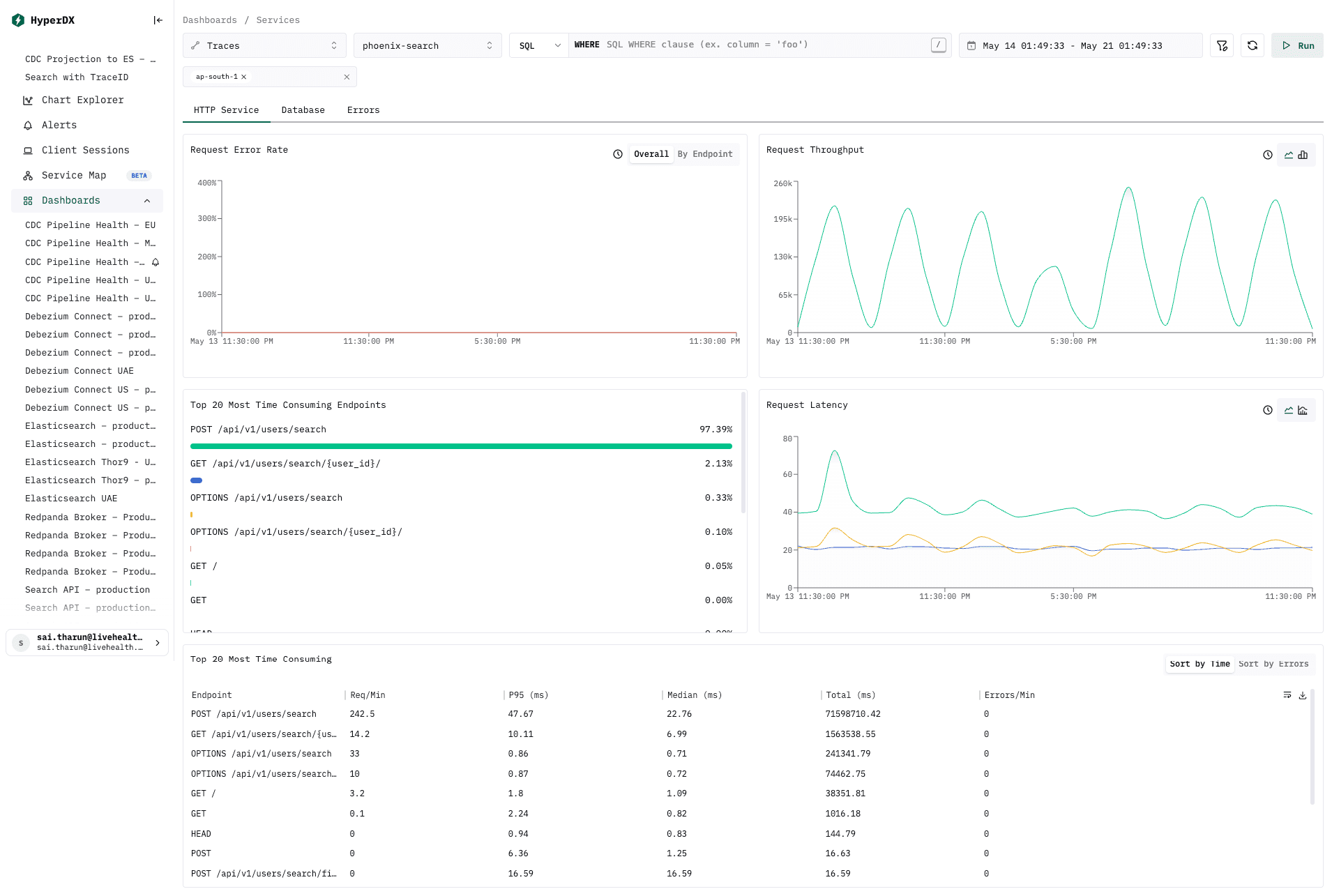
| API request error rate | 0% in the HTTP service dashboard |
| Main endpoint | POST /api/v1/users/search |
| Main endpoint share | About 97.39% of endpoint time |
| Search endpoint request rate | About 242.5 req/min in the top endpoints table |
| Search endpoint median latency | About 22.76 ms |
| Search endpoint p95 latency | About 47.67 ms |
| Overall request latency | Median roughly 21-23 ms; p95 roughly 43-48 ms |
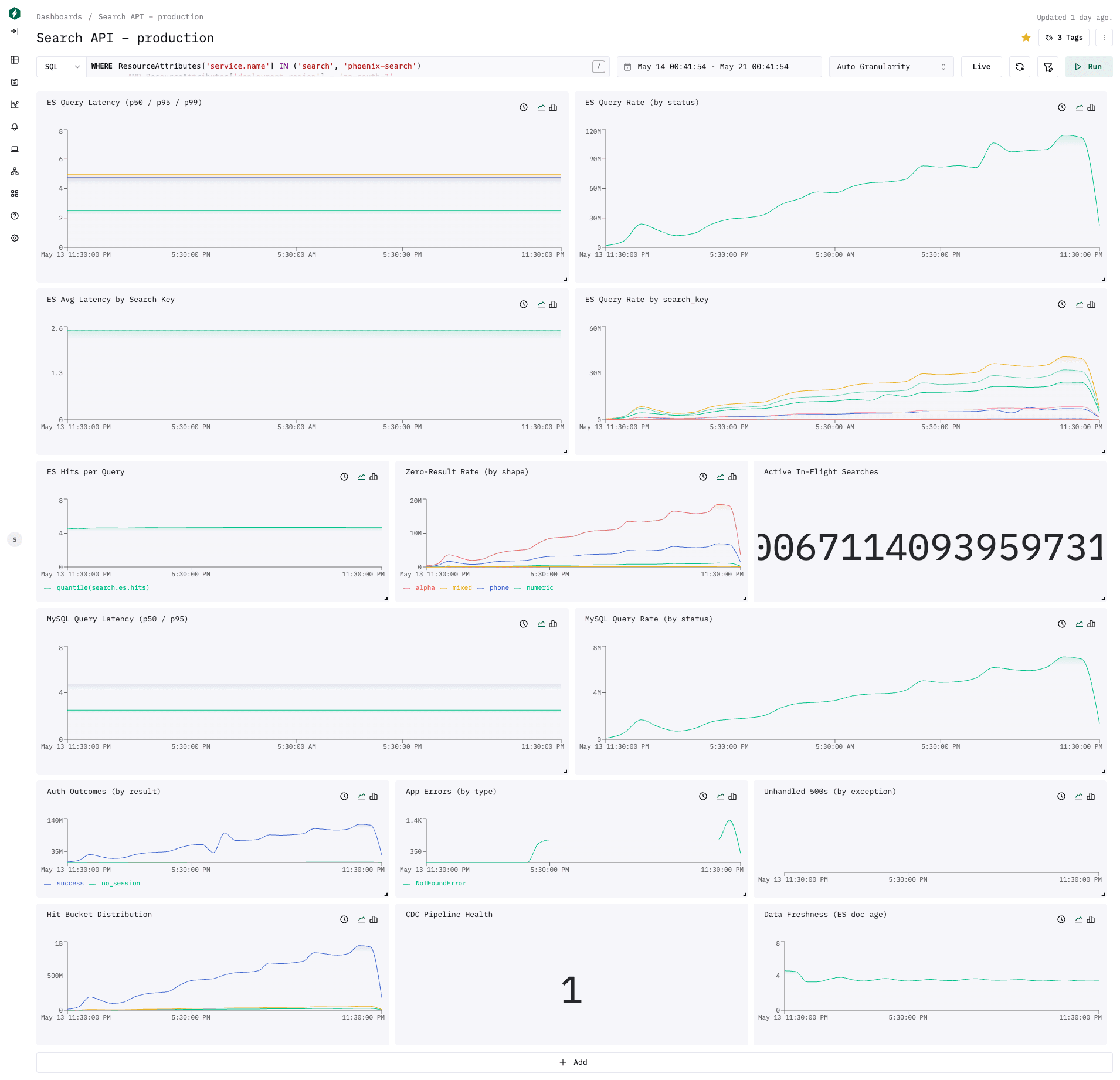
| ES query latency | p50 about 2.5 ms, p95 about 4.75 ms, p99 about 4.95 ms |
| MySQL query latency | p50 about 2.5 ms, p95 about 4.75 ms |
| ES hits per query | Around 4.6 in the dashboard tooltip |
| CDC health | 1 |
| ES data freshness | Around 3.6s in the dashboard tooltip |
The search service stayed well under the practical ES target of 10 ms for most observed ES queries in the saved dashboard window. API latency is higher than raw ES latency because it includes auth/session work, scope resolution, query construction, response shaping, and transport/runtime overhead.
Mapping and Analyzer Result
The migration works because the ES document is intentionally shaped for the search cases that used to need separate calls.
| Search Need | New Index Support |
|---|---|
| Patient name | search_as_you_type on full_name |
| Contact / alternate contact | keyword plus prefix analyzer fields |
| Lab patient ID | Exact, prefix, suffix, and segment fields |
| Manual sample ID | Exact, prefix, and segment fields |
| Order number | Exact, prefix, and segment fields |
| Lab bill ID | Exact and prefix fields |
| National IDs / passport | Exact, prefix, and segment fields depending on identifier format |
| Org, referral, branch filters | Denormalized arrays in the same ES document |
This lets Phoenix Search build one shape-routed query for the user input instead of issuing independent LRF/manual-sample/bill/patient lookups and merging them afterward.
OpenTelemetry Result
OpenTelemetry is a migration advantage because the new path emits query, request, dependency, and CDC freshness signals from one service boundary.
| Capability | What Phoenix Search Emits |
|---|---|
| API traces | FastAPI spans with route-level request context |
| Search span attributes | search.lab_id, search.search_key, search.query_shape, search.routing, search.is_multi_center, search.hit_count, search.zero_results |
| ES correlation | The active trace ID is passed as the Elasticsearch opaque_id |
| ES metrics | search.es.query.duration, search.es.query.total, search.es.hits, search.zero.results.total |
| MySQL metrics | search.mysql.query.duration, search.mysql.query.total |
| Auth metrics | search.auth.total |
| Error metrics | search.app.errors.total, search.unhandled.errors.total |
| CDC freshness | search.data.age, search.cdc.healthy |
| CDC consumer metrics | cdc.flow1.latency, cdc.flow2.latency, cdc.consumer.lag, cdc.messages.processed, cdc.dlq.sent |
| Logs | Trace and span IDs are added into structured logs |
Compared with the old preview path, this makes the production question easier to answer: for a slow or empty search, check one trace and see the API route, auth outcome, scope/routing, ES query latency, hit count, MySQL scope lookup, and CDC freshness.
Debugging Result
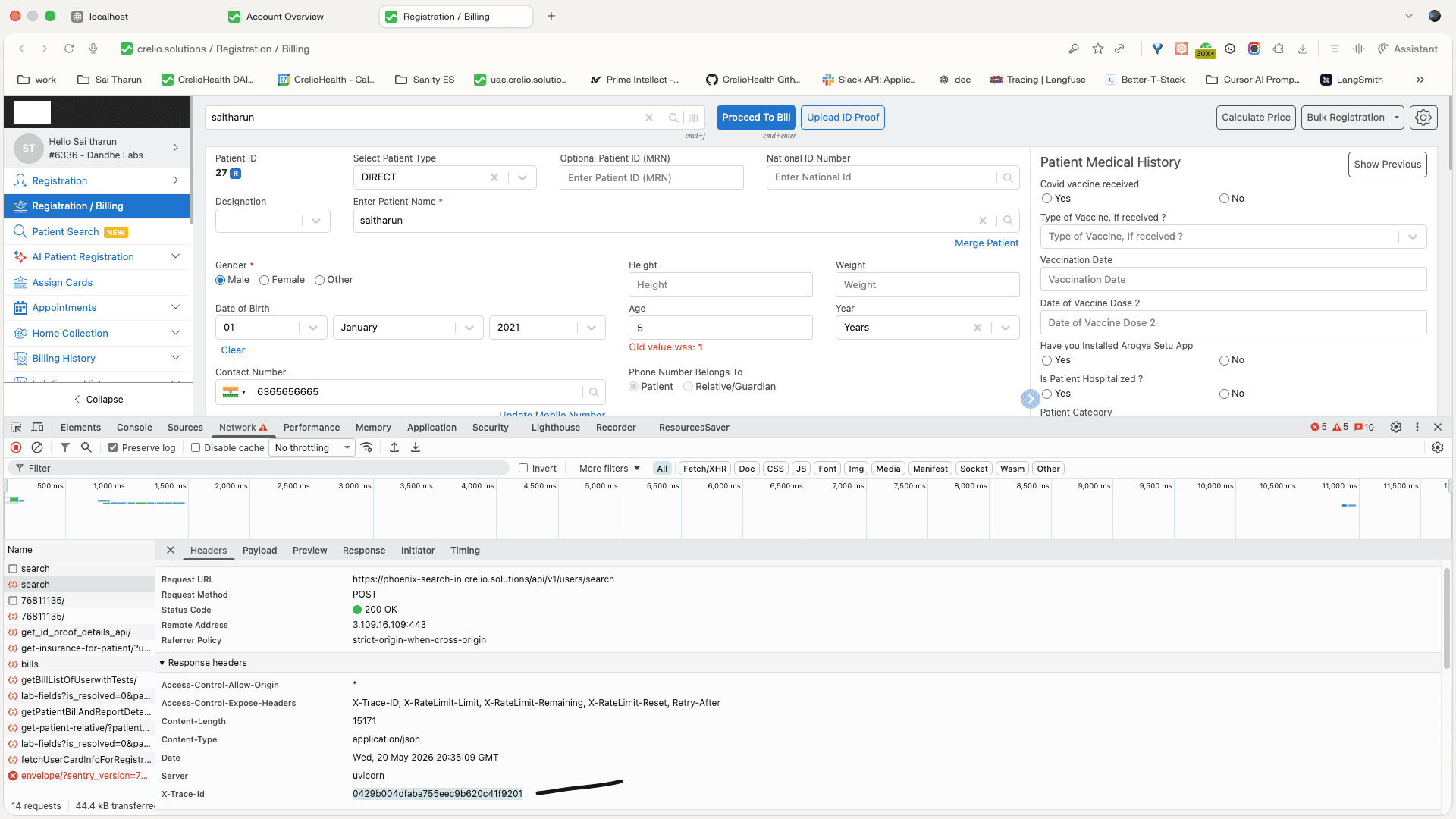
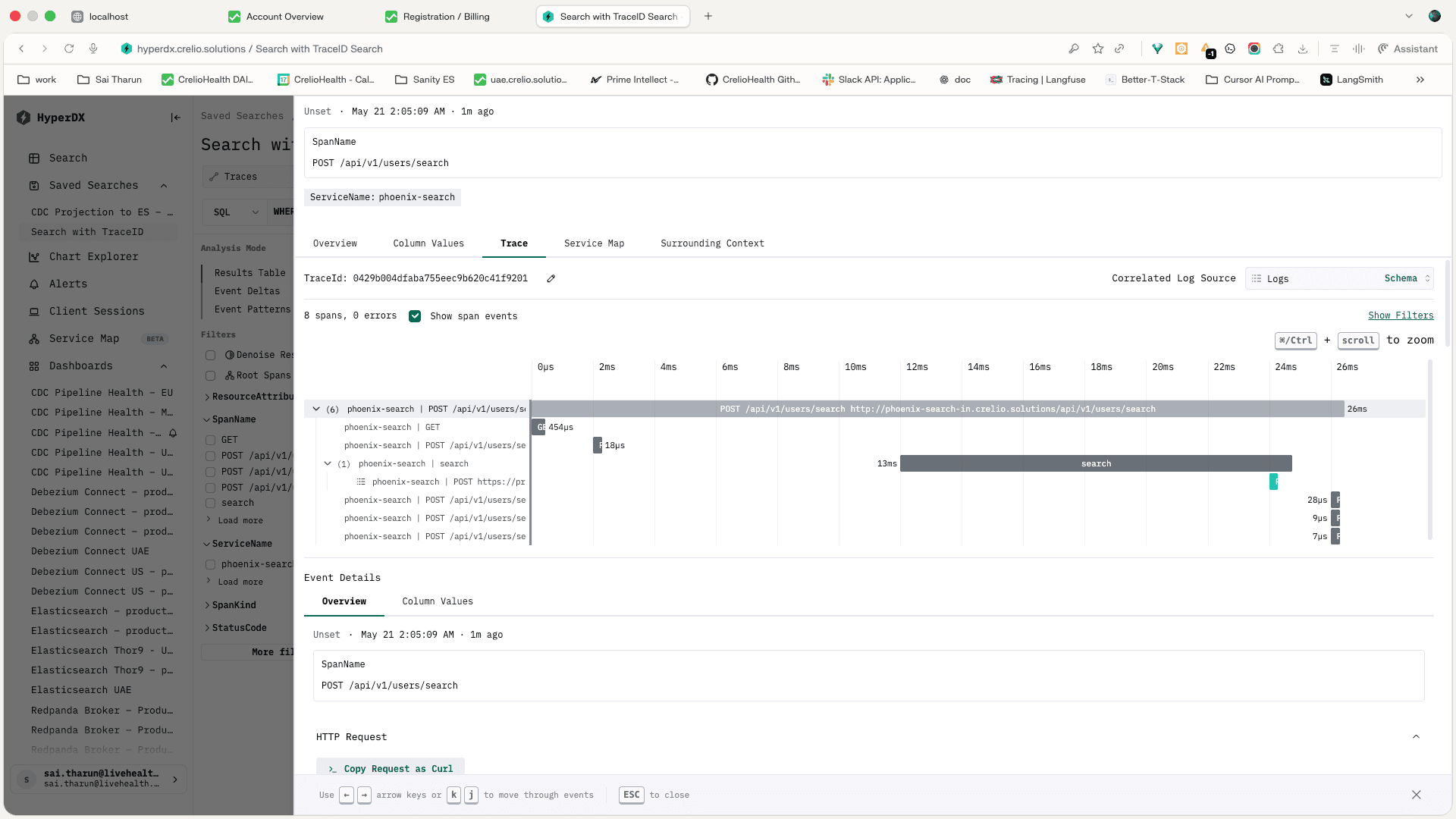
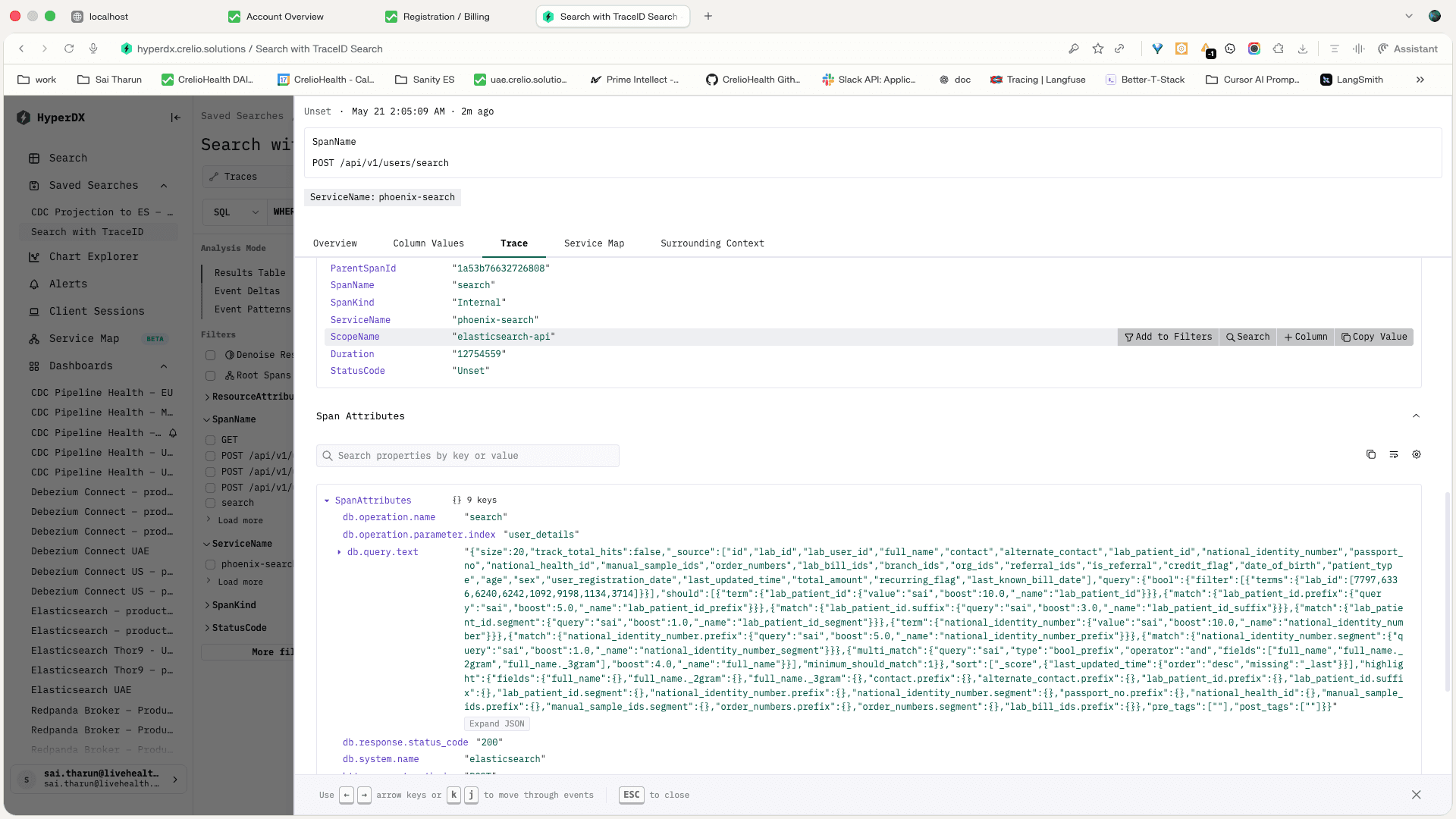
The post-migration debugging path is now trace-first. A frontend search request exposes the trace ID, HyperDX resolves that trace across the API, and the Elasticsearch span shows the actual search operation and query body. The reusable runbook lives in API Debugging.
| Debug Check | Evidence | Why This Is Useful |
|---|---|---|
| Browser request | POST https://phoenix-search-in.crelio.solutions/api/v1/users/search returns 200 and exposes X-Trace-Id | Support or engineering can start from the exact failed or slow browser request |
| Trace lookup | HyperDX opens the same trace ID and shows POST /api/v1/users/search with child spans and no trace errors | We can separate API time, auth/scope work, ES time, and runtime overhead without guessing |
| ES span | The trace includes an Elasticsearch search span for the user_details index with db.query.text and db.response.status_code=200 | We can confirm the generated query shape, target index, response status, and ES duration for the real request |
| Query correlation | Phoenix Search adds search attributes and sends the active trace ID as Elasticsearch opaque_id | API logs, HyperDX traces, and Elasticsearch request context line up around the same request |
| Operational outcome | The observed trace has no errors and the ES span is around the low-millisecond range | Debuggability improved while keeping the hot search path fast |
Elasticsearch Cluster Evidence
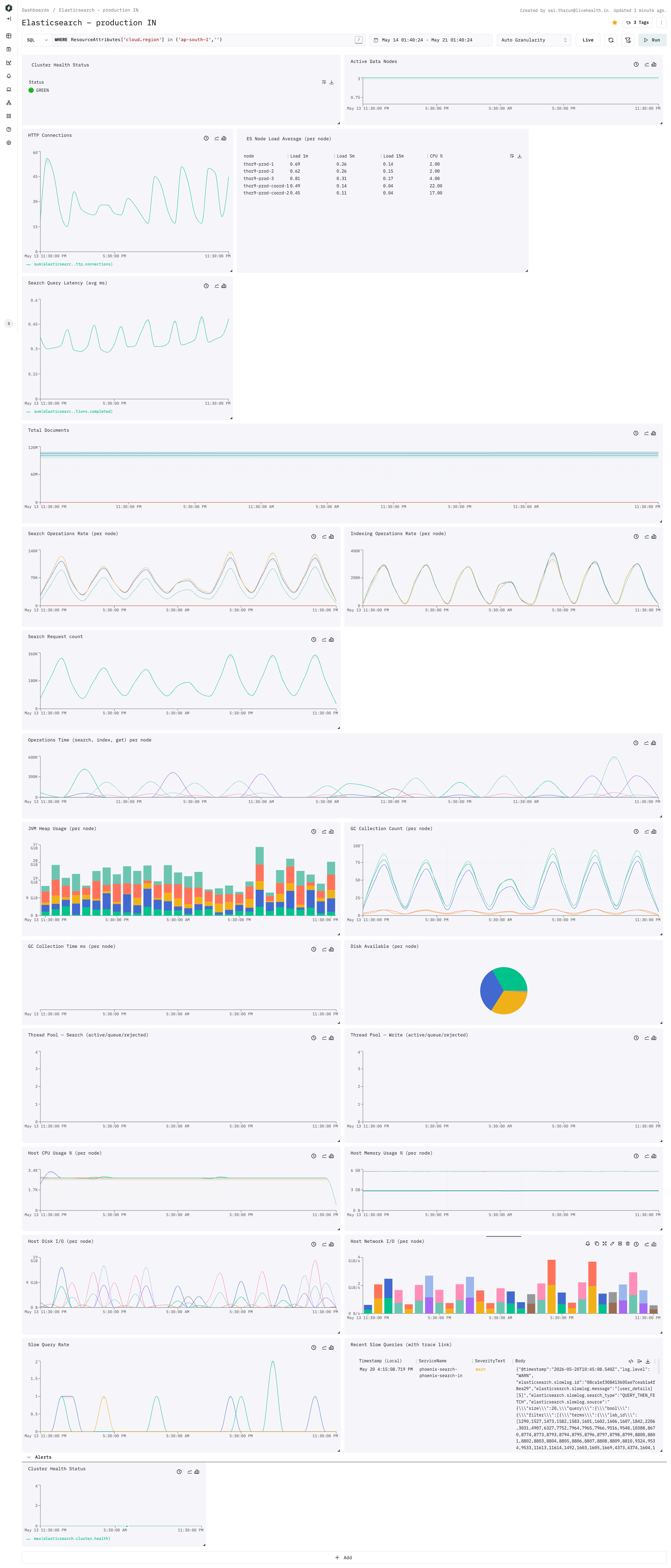
The Elasticsearch production IN dashboard shows the cluster stayed healthy during the observed window:
| Cluster Signal | Observed Value |
|---|---|
| Cluster health | GREEN |
| Active data nodes | 3 |
user_details status | Open, Healthy |
| Search operation rate | Periodic per-node peaks near the 100K-140K chart range |
| Indexing operation rate | Periodic per-node peaks near the 300K-400K chart range |
| Data node CPU | Around 2-4% in the node table |
| Coordinator CPU | Around 17-22% in the node table |
Routing Check
The new index requires Elasticsearch routing by lab_id. When checking a document directly, always include the route:
curl -s -u elastic:<PASSWORD> \
  "https://<ES_HOST>:9200/user_details/_doc/<USER_DETAILS_ID>?routing=<LAB_ID>"
A document can exist under one routing key and look missing under another. That is expected Elasticsearch behavior with required custom routing.