Operations
Run, deploy, monitor, and debug Phoenix Search
Phoenix Search Operations
This page collects the day-to-day commands and on-call checks for the Phoenix Search API and its CDC subsystem.
For the full data migration sequence, cdc-ctl, and the Go backfill tool, see CDC Tools and Backfill. For request-to-trace debugging, see API Debugging.
Run Locally
API Only
make install
cp .env.example .env
cp docker/.env.example docker/.env
make up-dev
make seed
make run
Full Local Stack
make up-all
make register-pipeline
make run-cdc
make register-source-connector
Test Infra
make test
make test-docker
make test-docker-up
make test-docker-down
API Health Checks
| Endpoint | Expected Healthy Response | Notes |
|---|---|---|
GET /health/live | 200 {"status":"alive"} | Process liveness only |
GET /health/ready | 200 with status: ready | Returns 503 if Elasticsearch, Redis, or MySQL is down |
GET /health | 200 with status: healthy or degraded | Includes dependency status and CDC freshness |
GET /metrics | Prometheus text | Exposes API, search, and CDC freshness metrics |
/health intentionally returns HTTP 200 even when degraded. Alert on the body fields, especially dependency statuses and cdc.status.
Example:
curl -s http://localhost:8000/health
curl -s http://localhost:8000/health/ready
curl -s http://localhost:8000/metrics
CDC Health Checks
The CDC consumer exposes its own health server, default port 8080.
| Endpoint | Purpose | Healthy | Unhealthy |
|---|---|---|---|
GET /health | Liveness | 200 when Kafka polling is recent | 503 |
GET /ready | Readiness | 200 when processing messages | 503 |
GET /metrics | Prometheus | Prometheus text format | - |
Example:
curl http://<TASK_IP>:8080/health
curl http://<TASK_IP>:8080/ready
curl http://<TASK_IP>:8080/metrics
CDC Runbook Order
When Phoenix Search data looks stale, check the planes in this order. It prevents chasing Elasticsearch symptoms when the problem is actually a connector, Redpanda, or consumer-group issue.
| Step | Question | Command |
|---|---|---|
| 1 | Is the API seeing stale indexed data? | curl -s http://<API_HOST>/health |
| 2 | Are Debezium connectors running? | CDC_CTL_ENV=production ./cdc-ctl status |
| 3 | Are Redpanda topics healthy and replicated? | CDC_CTL_ENV=production ./cdc-ctl topics verify |
| 4 | Is the consumer group stable and caught up? | CDC_CTL_ENV=production ./cdc-ctl lag |
| 5 | Are records failing into DLQ? | CDC_CTL_ENV=production ./cdc-ctl dlq inspect --n 50 --timeout 15s |
| 6 | Are MySQL binlog and heartbeat prerequisites healthy? | CDC_CTL_ENV=production ./cdc-ctl mysql check |
| 7 | Do we need a full incident bundle? | CDC_CTL_ENV=production ./cdc-ctl debug --tarball |
The operator CLI writes artifacts for every run under tools/cdc-ctl/runs/<timestamp>_<subcommand>/. Use those artifacts when handing an incident to another engineer.
Redpanda Runbook
Access Pattern
In production, run rpk from a Redpanda broker or another host inside the VPC. Laptop access to the internal SASL listener is not expected.
ssh -i ~/Documents/pem-files/redpanda.pem ubuntu@<REDPANDA_PUBLIC_IP>

export REDPANDA_BROKERS=<BROKER_1_PRIVATE_IP>:9093,<BROKER_2_PRIVATE_IP>:9093,<BROKER_3_PRIVATE_IP>:9093

rpk topic list \
  --user admin \
  --password '<ADMIN_PASSWORD>' \
--sasl-mechanism SCRAM-SHA-256| Endpoint | Purpose |
|---|---|
https://redpanda-in-console.crelio.solutions | Read-only Redpanda Console for consumer groups, topic messages, and lag |
https://redpanda-in-admin-console.crelio.solutions | Admin Redpanda Console |
<REDPANDA_PUBLIC_IP>:9644/public_metrics | Redpanda Prometheus metrics scraped by the OTel collector |
<BROKER_PRIVATE_IP>:9093 | Internal SASL plaintext listener used by services inside the VPC |
Cluster and Topic Checks
# Broker and partition health.
rpk cluster health \
  --user admin \
  --password '<ADMIN_PASSWORD>' \
  --sasl-mechanism SCRAM-SHA-256

# Expected Phoenix topics.
rpk topic list \
  --user admin \
  --password '<ADMIN_PASSWORD>' \
  --sasl-mechanism SCRAM-SHA-256

# Partition, leader, replica, and high-watermark details.
rpk topic describe phoenix.livehealthapp.userDetails -p \
  --user admin \
  --password '<ADMIN_PASSWORD>' \
  --sasl-mechanism SCRAM-SHA-256
Expected Phoenix data topics:
| Topic | Written By | Read By |
|---|---|---|
phoenix.livehealthapp.userDetails | phoenix-source-existing Debezium connector | CDC consumer MySQL materializer |
phoenix.livehealthapp.billing | phoenix-source-existing Debezium connector | CDC consumer MySQL materializer |
phoenix.livehealthapp.labReportRelation | phoenix-source-existing Debezium connector | CDC consumer MySQL materializer |
phoenix.livehealthapp.user_meta | phoenix-source-projection Debezium connector | CDC consumer Elasticsearch syncer |
phoenix.cdc.connector-dlq | Kafka Connect / Debezium | Operators |
phoenix.cdc.dead-letter-queue | Python CDC consumer | Operators |
Production Replication Guardrails
On the 3-node Redpanda cluster, Phoenix CDC topics should use replication factor 3. Critical topics should also use min.insync.replicas=2, so writes fail fast if too many brokers are unavailable.
| Topic Class | Required Guardrail |
|---|---|
| Debezium data topics | replication.factor=3, 6 partitions |
| Debezium schema history topics | replication.factor=3 |
| Kafka Connect internal topics | connect-configs, connect-offsets, and connect-status with RF=3 |
| Critical CDC topics | min.insync.replicas=2 |
| Kafka Connect producer | producer.acks=all; producer.enable.idempotence=true |
Check the expected topic policy with the operator CLI first:
CDC_CTL_ENV=production ./cdc-ctl topics list
CDC_CTL_ENV=production ./cdc-ctl topics verify
CDC_CTL_ENV=production ./cdc-ctl topics describe phoenix.livehealthapp.userDetails
If a cluster was expanded from RF=1 to RF=3, existing topics do not automatically become RF=3. The recovery notes in cdc/CDC_RECOVERY_LOG.md document this as an explicit migration step.
Consumer Group and Rebalance Checks
rpk group describe phoenix-cdc-unified \
  --user admin \
  --password '<ADMIN_PASSWORD>' \
--sasl-mechanism SCRAM-SHA-256| Field | Healthy Meaning | What to Do if Bad |
|---|---|---|
STATE | Stable | PreparingRebalance is normal for 10-30 seconds after deploy/scale; if it stays longer than 60 seconds, check task crashes and auth errors |
MEMBERS | Matches ECS desired count | If lower, a task failed to join the group or is crash-looping |
TOTAL-LAG | Draining or below alert threshold | If growing, check whether producer rate is snapshot-driven or the consumer is bottlenecked |
Per-partition LAG | Roughly balanced | One hot partition usually means one user/key stream or one bad consumer member |
HOST / MEMBER-ID | Maps partitions to a task | Use it to find the exact ECS task logs |
Consumer group rebalance happens when the CDC service scales, a task restarts, or a member stops polling. During rebalance, Redpanda revokes and reassigns partitions, and the Phoenix consumer pauses processing briefly to preserve in-partition ordering.
The safe scaling ceiling is the topic partition count: 6 consumer tasks. More than 6 tasks are usually idle because Phoenix topics are created with 6 partitions.
aws ecs update-service \
  --cluster phoenix \
  --service cdc-consumer \
  --desired-count 6
Lag Interpretation
| Pattern | Likely Cause | Next Check |
|---|---|---|
Lag spikes on only userDetails with many op: "r" messages | Debezium incremental snapshot signal | Check livehealthapp.debezium_signal |
| Lag grows on all topics | Consumer-wide bottleneck, MySQL issue, ES issue, or task crash | Consumer logs, MySQL processlist, ES write thread pool |
| Lag is only on partitions owned by one member | Bad task or poison message loop | ECS logs for that task, DLQ metrics |
MEMBERS=0 | Consumer service down or cannot join group | ECS service desired/running count and SASL ACLs |
GROUP_AUTHORIZATION_FAILED | CDC_CONSUMER_GROUP does not match ACL | Set CDC_CONSUMER_GROUP=phoenix-cdc-unified |
UNKNOWN_TOPIC_OR_PART | Debezium topics were not created | Check connector status and connector task trace |
NOT_LEADER_FOR_PARTITION | Broker restart or partition movement | Usually transient; if persistent, run rpk cluster health |
Sample messages when you need to confirm whether a lag spike is live traffic or a snapshot:
rpk topic consume phoenix.livehealthapp.userDetails \
  --offset end \
  -n 1 \
  --user admin \
  --password '<ADMIN_PASSWORD>' \
  --sasl-mechanism SCRAM-SHA-256 \
  -f '%T p%p:o%o %v\n'
In Debezium envelopes, op: "r" means snapshot/read, op: "c" means insert, op: "u" means update, and op: "d" means delete.
Debezium Runbook
Connector Status
Phoenix Search has two Debezium MySQL connectors.
| Connector | Captures | Output |
|---|---|---|
phoenix-source-existing | userDetails, billing, labReportRelation | Source CDC topics consumed into user_meta |
phoenix-source-projection | user_meta | Projection topic consumed into Elasticsearch |
CDC_CTL_ENV=production ./cdc-ctl status
CDC_CTL_ENV=production ./cdc-ctl offsets

curl -s http://<CONNECT_HOST>:8083/connectors/phoenix-source-existing/status | jq .
curl -s http://<CONNECT_HOST>:8083/connectors/phoenix-source-projection/status | jq .
Check these fields in the status response:
| Field | Expected |
|---|---|
connector.state | RUNNING |
tasks[].state | RUNNING |
tasks[].trace | Empty unless a task failed |
Restart failed tasks first:
CDC_CTL_ENV=production ./cdc-ctl restart --only-failedUse connector recreation only when status or config is corrupted. Connector deletion preserves offsets in connect-offsets; it does not clear them.
CDC_CTL_ENV=production ./cdc-ctl recreate --dry-run
CDC_CTL_ENV=production ./cdc-ctl recreate --yes --settle-seconds 30
Debezium Signals
Debezium signals are for asking a running connector to re-read rows into Kafka without resetting connector offsets. Phoenix enables source signals through livehealthapp.debezium_signal on both connectors.
SELECT *
FROM livehealthapp.debezium_signal
ORDER BY id DESC
LIMIT 5;
Use an incremental snapshot signal when the connector needs to re-capture rows:
INSERT INTO livehealthapp.debezium_signal (id, type, data)
VALUES (
  'resync-user-details-20260520',
  'execute-snapshot',
  '{"data-collections": ["livehealthapp.userDetails"], "type": "incremental"}'
);
Use a projection-table snapshot when user_meta was repaired and Elasticsearch needs to receive projection events:
INSERT INTO livehealthapp.debezium_signal (id, type, data)
VALUES (
  'resync-user-meta-20260520',
  'execute-snapshot',
  '{"data-collections": ["livehealthapp.user_meta"], "type": "incremental"}'
);
Signals produce snapshot read events into the same Redpanda topics as live binlog events, so lag can spike while the snapshot runs. For normal projection recomputation, prefer the backfill repair modes; signals re-emit rows, they do not recompute billing/sample aggregates by themselves.
For the detailed signal flow and external Debezium references, see CDC.
Connector Recovery Guardrails
| Situation | Safe First Action | Avoid |
|---|---|---|
Task is FAILED with a transient MySQL or network error | cdc-ctl restart --only-failed | Deleting offsets |
| Connector config drifted from repo JSON | cdc-ctl apply --dry-run, then cdc-ctl apply | Manual config edits in Connect UI |
| Binlog position is near oldest available binlog | Backfill/repair plan before offset reset | Waiting until MySQL purges the required binlog |
| Schema history topic is missing or corrupt | Follow cdc/CDC_RECOVERY_LOG.md recovery sequence | snapshot.mode=never with empty schema history |
| Kafka Connect internal offsets are corrupt | Use cdc-ctl recover with confirmation | Deleting connect-offsets while Connect is still running |
Before touching offsets, capture connector status, offsets, topic state, MySQL binlogs, and a debug bundle:
CDC_CTL_ENV=production ./cdc-ctl status
CDC_CTL_ENV=production ./cdc-ctl offsets
CDC_CTL_ENV=production ./cdc-ctl topics verify
CDC_CTL_ENV=production ./cdc-ctl mysql check
CDC_CTL_ENV=production ./cdc-ctl debug --tarball
Deployment References
API Runtime
The API starts from the Phoenix Search package entrypoint and reads configuration from SEARCH_* environment variables. In production, the ALB can forward traffic with /phoenix-search/*; the service strips that prefix internally.
Core runtime dependencies:
| Dependency | Required For |
|---|---|
| Elasticsearch | User search and CDC freshness probe |
| Redis | Web session lookup and rate-limit state |
| MySQL | User detail lookup and search-scope resolution |
| OTLP endpoint | OpenTelemetry traces, metrics, and logs |
| Sentry DSN | Error reporting |
API Configuration Variables
Defaults are defined in search/settings.py. The settings prefix is SEARCH_, so a field named mysql_host is configured as SEARCH_MYSQL_HOST.
| Variable | Default | Description |
|---|---|---|
SEARCH_HOST | 127.0.0.1 | Bind host for the API server |
SEARCH_PORT | 8000 | Bind port |
SEARCH_WORKERS_COUNT | 1 | Uvicorn/Gunicorn worker count |
SEARCH_ENVIRONMENT | dev | Runtime environment: dev, e2e, pytest, staging, or production |
SEARCH_LOG_LEVEL | INFO | Application log level |
SEARCH_LOG_JSON | true | Emit JSON logs when true |
Elasticsearch:
| Variable | Default | Description |
|---|---|---|
SEARCH_ES_URL | http://localhost:9210 | Elasticsearch endpoint |
SEARCH_ES_USER | elastic | Elasticsearch username |
SEARCH_ES_PASSWORD | empty | Elasticsearch password |
SEARCH_ES_API_KEY | empty | Optional API key authentication |
SEARCH_ES_CA_CERT | /app/certs/ca.crt | CA certificate path for HTTPS clusters |
SEARCH_ES_MAX_RETRIES | 3 | ES client retry count |
SEARCH_ES_REQUEST_TIMEOUT | 30 | ES client request timeout in seconds |
SEARCH_ES_SEARCH_TIMEOUT | 5 | Per-search request timeout |
SEARCH_ES_MAX_CONNECTIONS | 20 | ES HTTP connection pool size |
SEARCH_ES_CAPTURE_SEARCH_QUERY | false | Capture search query in ES OTEL instrumentation |
Search behavior and freshness:
| Variable | Default | Description |
|---|---|---|
SEARCH_DEFAULT_SIZE | 10 | Default hit count returned by user search |
SEARCH_RECENCY_DECAY_ENABLED | false | Enables function_score recency ranking |
SEARCH_RECENCY_DECAY_SCALE_DAYS | 90 | Recency decay scale |
SEARCH_RECENCY_DECAY_OFFSET_DAYS | 7 | Recency grace period |
SEARCH_RECENCY_DECAY_FACTOR | 0.5 | Recency decay factor |
SEARCH_RECENCY_DECAY_WEIGHT | 1.5 | Recency scoring weight |
SEARCH_CDC_STALE_THRESHOLD_SECONDS | 600 | CDC freshness threshold used by /health |
SEARCH_CDC_PROBE_INTERVAL_SECONDS | 30 | CDC freshness probe interval |
Redis, auth, and rate limiting:
| Variable | Default | Description |
|---|---|---|
SEARCH_REDIS_HOST | localhost | Redis host for sessions and shared KV |
SEARCH_REDIS_PORT | 7001 | Redis port |
SEARCH_REDIS_CONNECTION_TYPE | cluster | cluster or standalone |
SEARCH_REDIS_USER | empty | Redis username |
SEARCH_REDIS_PASS | empty | Redis password |
SEARCH_SESSION_COOKIE_AGE | 28800 | Session max age in seconds |
SEARCH_JWT_SECRET | empty | Mobile JWT secret |
SEARCH_PY2_JWT_SECRET | empty | Legacy Python 2 JWT secret |
SEARCH_EPHEMERAL_JWT_SECRET | empty | Ephemeral web JWT secret |
SEARCH_EPHEMERAL_JWT_MAX_AGE_SECONDS | 300 | Ephemeral token max age |
SEARCH_RATE_LIMIT_REDIS_URL | empty | Dedicated Redis URL for dynamic rate limits; empty disables dynamic rate limiting |
SEARCH_RATE_LIMIT_PER_MINUTE | 120 | Default search route limit |
SEARCH_RATE_LIMIT_DEGRADED_PER_MINUTE | 30 | Degraded-mode route limit |
SEARCH_RATE_LIMIT_EMERGENCY_PER_MINUTE | 5 | Emergency-mode route limit |
SEARCH_RATE_LIMIT_CONFIG_CACHE_TTL | 5 | Seconds to cache the active rate-limit mode |
MySQL and telemetry:
| Variable | Default | Description |
|---|---|---|
SEARCH_MYSQL_HOST | mysql-db | MySQL host |
SEARCH_MYSQL_PORT | 3306 | MySQL port |
SEARCH_MYSQL_USER | livehealth-local | MySQL username |
SEARCH_MYSQL_PASSWORD | empty | MySQL password |
SEARCH_MYSQL_DATABASE | livehealthapp | MySQL database |
SEARCH_MYSQL_POOL_SIZE | 10 | MySQL pool size |
SEARCH_MYSQL_POOL_RECYCLE | 3600 | MySQL connection recycle interval in seconds |
SEARCH_OPENTELEMETRY_ENDPOINT | empty | OTLP gRPC endpoint |
SEARCH_OPENTELEMETRY_API_KEY | empty | OTLP authorization value |
SEARCH_DEPLOYMENT_REGION | ap-south-1 | Region resource attribute |
SEARCH_SENTRY_DSN | empty | Sentry DSN |
SEARCH_SENTRY_SAMPLE_RATE | 1.0 | Sentry tracing sample rate |
CDC Consumer Runtime
The CDC consumer should be deployed as an ECS task with:
| Setting | Value |
|---|---|
| Container image | <ECR_REPO>/phoenix-cdc:latest |
| Health port | 8080 |
| Liveness | GET /health |
| Readiness | GET /ready |
| Desired count | Start at 1; scale up to 6 if lag requires it |
| Environment | CDC_* variables from env file or Secrets Manager |
Operational Make Targets
| Target | Description |
|---|---|
make up-dev | Start Redis, Elasticsearch, and Kibana |
make up-all | Start all local services plus HyperDX |
make down | Stop local containers |
make run | Start the API |
make lint | Run Ruff and mypy |
make test | Unit tests without Docker |
make test-docker | Full test suite with Docker infra |
make es-api-key | Generate an Elasticsearch API key into .env |
make register-pipeline | Register user-search-projection-pipeline |
make run-cdc | Start Redpanda, Debezium Connect, Redpanda Console, and consumer |
make down-cdc | Stop CDC containers |
make destroy-cdc | Stop CDC containers and remove volumes |
make cdc-logs | Tail CDC container logs |
make redpanda-console | Open Redpanda Console at local port 8100 |
make register-source-connector | Register both Debezium source connectors |
make connector-status | Show Debezium connector health |
make dashboards-push | Push HyperDX dashboards |
make backfill-migrate | Populate user_meta from MySQL source tables |
make backfill-run | Backfill Elasticsearch from the projection |
Metrics and Alerts
API Metrics
| Metric | Description |
|---|---|
search_data_age_seconds | Age of the newest document in Elasticsearch |
search_cdc_healthy | 1 when CDC freshness is below threshold, otherwise 0 |
| Search query metrics | Query count, duration, hit count, zero-result count |
| Auth metrics | Session and token auth success/failure counts |
| Bucket metrics | Hit count by response bucket |
CDC freshness is controlled by:
| Variable | Default | Description |
|---|---|---|
SEARCH_CDC_STALE_THRESHOLD_SECONDS | 600 | Age above which search data is stale |
SEARCH_CDC_PROBE_INTERVAL_SECONDS | 30 | Probe interval |
CDC Consumer Metrics
| Metric | Description |
|---|---|
cdc_up | Poll loop is alive |
cdc_last_poll_seconds_ago | Seconds since the last Kafka poll |
cdc_last_success_seconds_ago | Seconds since the last processed message |
cdc_consumer_lag | Total lag across partitions |
cdc_messages_processed_total | Successfully processed messages |
cdc_messages_failed_total | Failed messages |
cdc_messages_dlq_total | Messages sent to DLQ |
cdc_messages_retried_total | Retry attempts |
Alert Conditions
| Signal | Condition | Severity | First Check |
|---|---|---|---|
cdc_up | == 0 for more than 2 minutes | Critical | Consumer task and Kafka connectivity |
search_cdc_healthy / search.cdc.healthy | == 0 for more than 5 minutes | Critical | CDC consumer, connectors, Redpanda, Elasticsearch |
search_data_age_seconds / search.data.age | Average over 300 seconds for more than 5 minutes | Warning | Consumer lag and processing latency |
cdc_consumer_lag | Over 10,000 for 10-15 minutes | Warning | Scale consumer or inspect slow handlers |
cdc_messages_failed_total | Increasing for 5 minutes | Warning | Consumer logs and DLQ |
cdc_messages_dlq_total | Any increment | Warning | DLQ topic payload and original offset metadata |
Production Metrics Snapshot
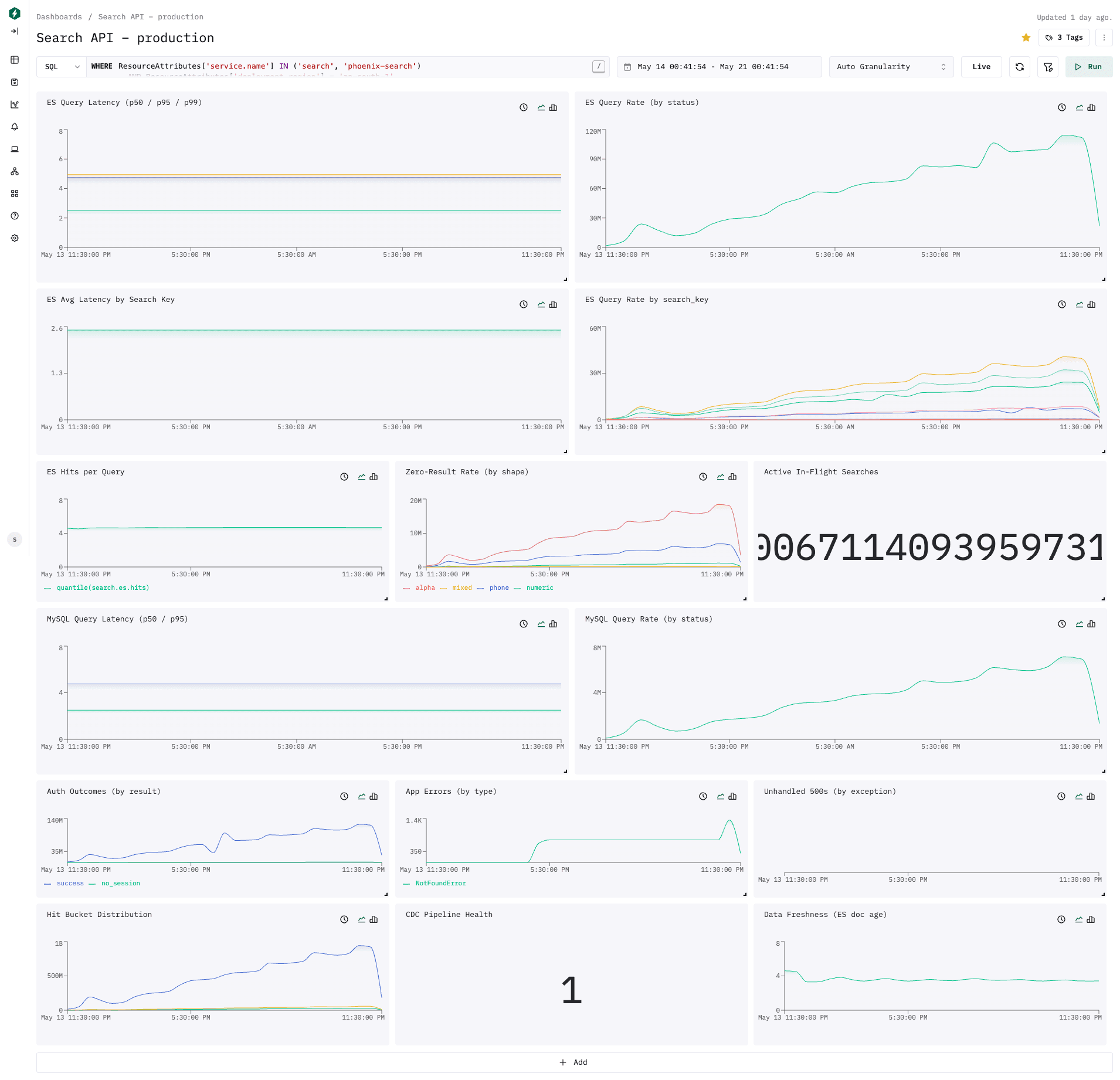
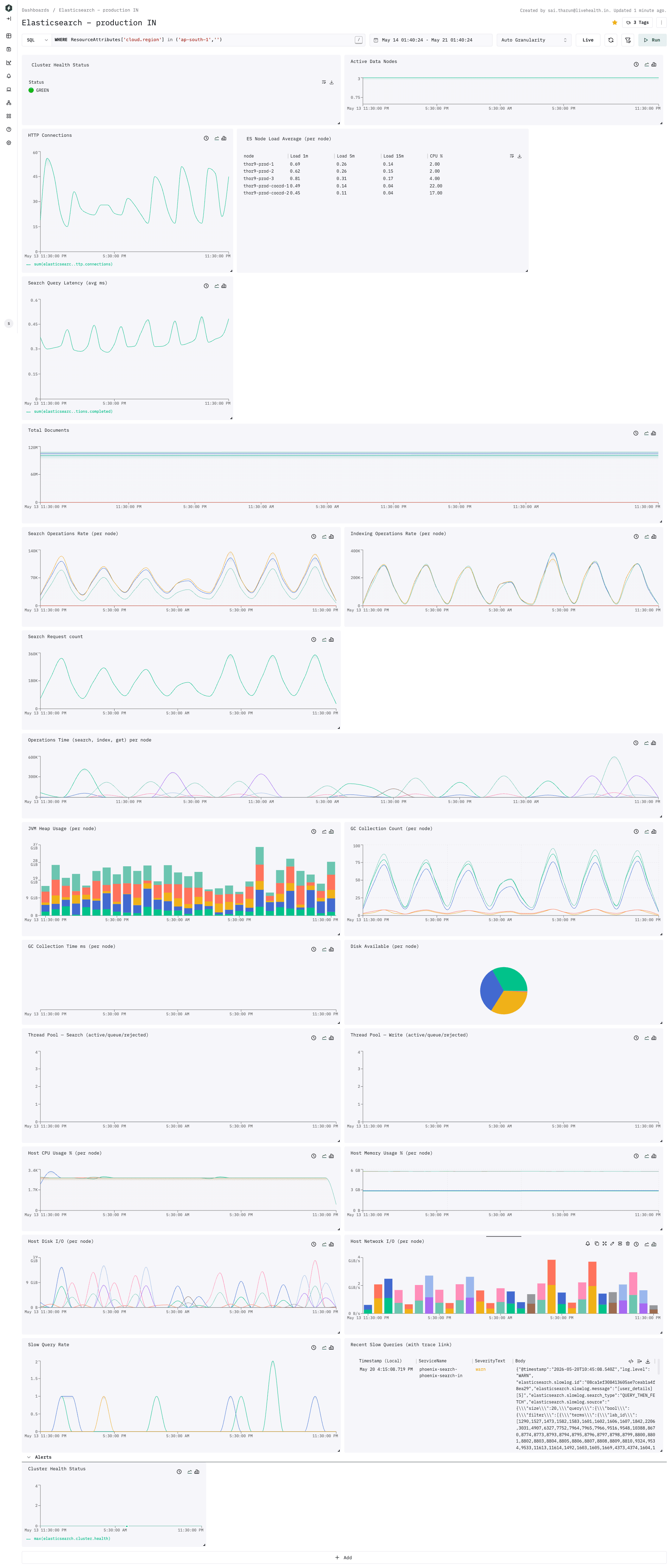
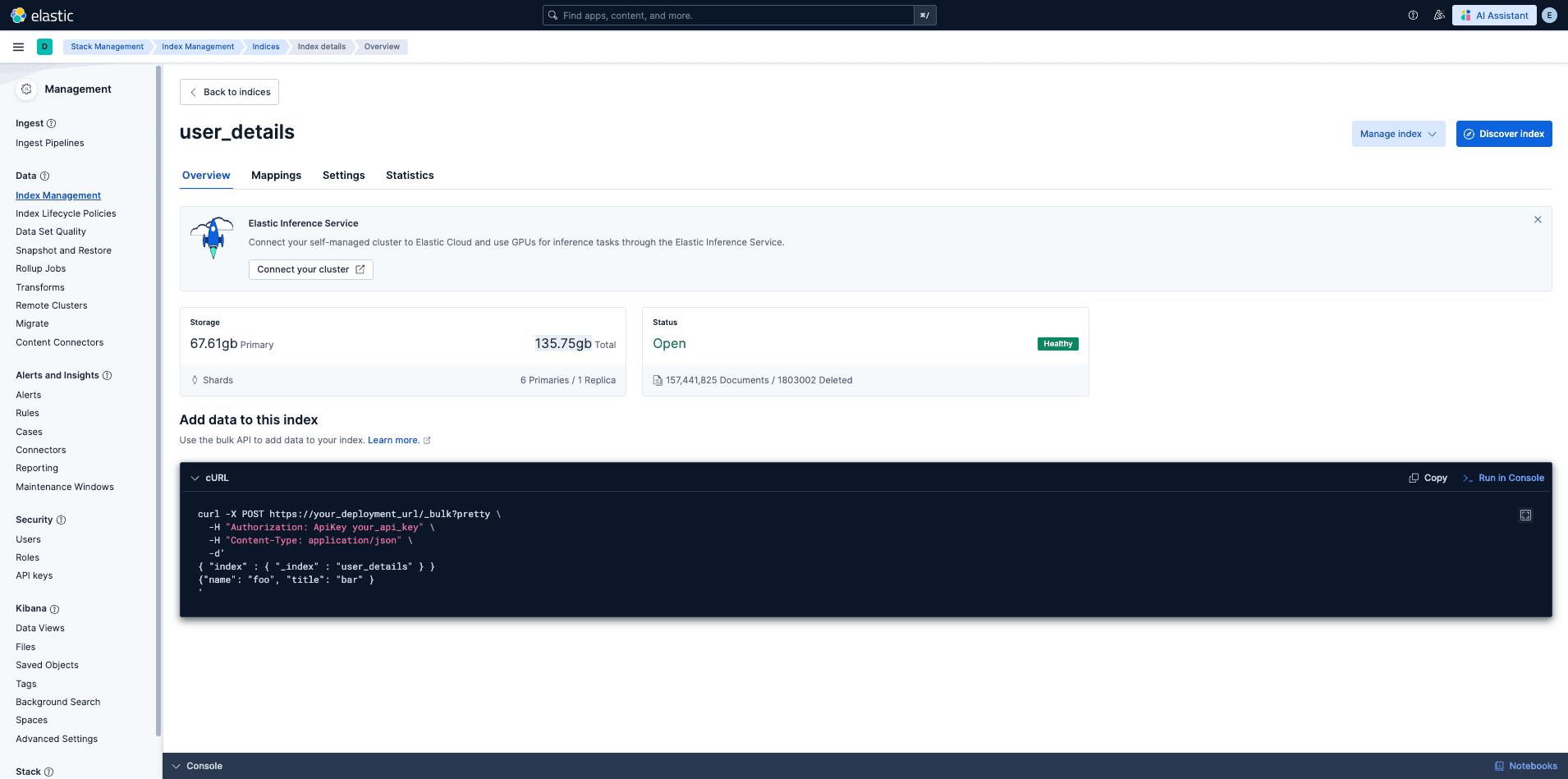
These values are from the Phoenix Search production IN dashboard screenshots. Treat this section as observed Phase 1 production evidence, not a permanent SLO target.
For the full migration outcome, old-vs-new index comparison, request-count reduction, analyzer mapping notes, and OpenTelemetry advantages, see Post-Migration Results.
Success Signals
| Area | Observed Value | Why It Matters |
|---|---|---|
| API request errors | 0% error rate in the HTTP service dashboard | No visible request-level failure rate in the observed window |
| Top endpoint errors | 0 errors/min for the highest traffic endpoints | Search and detail routes were not producing endpoint-level errors |
| Unhandled 500s | No visible unhandled 500 series | No observed server-error spike |
| CDC health | 1 | CDC freshness probe reports healthy |
| ES data freshness | Around 3.6s document age in the dashboard tooltip | Search index is staying close to MySQL updates |
| ES cluster health | GREEN | Cluster is serving with expected shard health |
| ES active data nodes | 3 | All production data nodes are active |
user_details index status | Open, Healthy | Main search index is available |
API Traffic and Latency
| Metric | Observed Value |
|---|---|
| Dominant endpoint | POST /api/v1/users/search |
| Search endpoint share | About 97.39% of endpoint time in the HTTP service view |
| Search endpoint request rate | About 242.5 req/min in the top endpoints table |
| Search endpoint median latency | About 22.76 ms |
| Search endpoint p95 latency | About 47.67 ms |
| Detail endpoint share | About 2.13% |
| Detail endpoint request rate | About 14.2 req/min |
| Detail endpoint median latency | About 6.99 ms |
| Detail endpoint p95 latency | About 10.11 ms |
| Overall request latency | Median roughly 21-23 ms; p95 roughly 43-48 ms across the shown screenshots |
| Peak request throughput | Periodic peaks near 230K-250K requests per dashboard bucket |
POST /api/v1/users/search is the only endpoint that materially drives API cost in the observed window. Detail lookup traffic is much smaller and faster.
Search, MySQL, and ES Query Performance
| Metric | Observed Value |
|---|---|
| ES query latency | p50 ~2.5 ms, p95 ~4.75 ms, p99 ~4.95 ms |
| MySQL query latency | p50 ~2.5 ms, p95 ~4.75 ms |
| ES hits per query | Around 4.6 in the dashboard tooltip |
| Top search keys by volume | patient_name and multi_center are the largest visible series |
| Zero-result shape | alpha is the largest visible zero-result shape |
The API p95 is higher than raw ES/MySQL query latency because it includes request handling, auth/session work, filter resolution, query building, response shaping, and network/runtime overhead.
Elasticsearch Cluster and Index Capacity
| Metric | Observed Value |
|---|---|
user_details storage | 67.61 GB primary, 135.75 GB total |
user_details shard layout | 6 primary shards, 1 replica |
user_details documents | About 157.44M documents |
| HTTP connections | Periodic range around 15-55 |
| Data node CPU | Around 2-4% in the node load table |
| Coordinator CPU | Around 17-22% in the node load table |
| Search operation rate | Periodic per-node peaks near the 100K-140K chart range |
| Indexing operation rate | Periodic per-node peaks near the 300K-400K chart range |
The index is large enough that routing matters operationally. For point checks, always use the lab_id route:
curl -s -u elastic:<PASSWORD> \
  "https://<ES_HOST>:9200/user_details/_doc/<USER_DETAILS_ID>?routing=<LAB_ID>"
Dashboard Evidence

Dashboards
Dashboard definitions are maintained as code in the Phoenix Search repo.
| File | Dashboard |
|---|---|
dashboards/cdc.json | CDC pipeline dashboard |
dashboards/cdc-alerts.json | CDC alert definitions |
dashboards/debezium.json | Debezium Connect dashboard |
dashboards/redpanda.json | Redpanda broker dashboard |
Common commands:
phoenix-search dashboards push --api-key YOUR_KEY --env production
phoenix-search dashboards alerts-push \
  --api-key YOUR_KEY \
  --env production \
  --alert-channel slack_webhook \
  --alert-webhook-id YOUR_WEBHOOK_ID
phoenix-search dashboards diff --api-key YOUR_KEY
Makefile shortcut:
make dashboards-push API_KEY=your_key ENV=productionCommon Debugging
API returns no search results
Check:
- Session resolves to the expected lab, branch, organization, and collection-center scope.
- The selected
search_keyincludes the field being searched. search_fieldsdoes not filter out every valid field for the selected mapping.- Elasticsearch routing matches the expected lab ID.
- The ES circuit breaker is not open.
Useful commands:
curl -s http://localhost:8000/health
curl -s http://localhost:8000/metrics | grep search
curl -s -u elastic:<PASSWORD> "http://localhost:9210/user_details/_count"
curl -s -u elastic:<PASSWORD> \
  "http://localhost:9210/user_details/_doc/<USER_DETAILS_ID>?routing=<LAB_ID>"
Always include routing=<LAB_ID> when checking a specific ES document. The user_details index requires routing, and Phoenix Search indexes each document under its lab_id.
/health/ready returns 503
Read the dependency section in the response body. The readiness endpoint checks Elasticsearch, Redis, and MySQL.
curl -s http://localhost:8000/health/readyTypical fixes:
| Dependency | First Check |
|---|---|
| Elasticsearch | Container status, ES credentials, cluster health |
| Redis | Host, port, cluster mode, credentials |
| MySQL | Host, security group, credentials, pool exhaustion |
CDC consumer not processing messages
Symptoms: consumer /health is 200, /ready is 503, or processed-message counters stop increasing.
curl -s http://<CONNECT_HOST>:8083/connectors/phoenix-source-existing/status
rpk group describe phoenix-cdc-unified
docker logs <container_id> --tail 100
Common causes:
- Debezium connector is down.
- Consumer group rebalance is stuck.
- All messages are failing and retries are exhausting.
Debezium connector failed
curl -s http://<CONNECT_HOST>:8083/connectors/phoenix-source-existing/status
curl -X POST http://<CONNECT_HOST>:8083/connectors/phoenix-source-existing/tasks/0/restart
Common causes:
- MySQL binlog expired and the connector lost its position.
- MySQL network or credential failure.
- Schema change on a captured table.
Messages are going to DLQ
rpk topic consume phoenix.cdc.dead-letter-queue --num 5Check the message headers for the original topic, partition, and offset. Common causes are malformed Debezium events, MySQL pool exhaustion, and Elasticsearch mapping conflicts.
Consumer lag is increasing
rpk group describe phoenix-cdc-unified
curl -s http://<TASK_IP>:8080/metrics | grep cdc_messages_processed
Possible fixes:
- Scale the consumer up to the partition count.
- Increase
CDC_MYSQL_POOL_SIZEif MySQL writes are bottlenecked. - Check MySQL with
SHOW PROCESSLIST. - Check Elasticsearch write thread pool and mapping failures.
CDC phase detection is wrong
mysql -e "SHOW COLUMNS FROM user_meta" | grep full_nameForce the phase when needed:
CDC_PHASE_OVERRIDE=running
CDC_PHASE_OVERRIDE=migration
DDL is blocked on captured tables
Debezium can hold metadata locks on captured tables. Stop both connectors before DDL, then resume them after the migration.
curl -X PUT http://<CONNECT_HOST>:8083/connectors/phoenix-source-projection/stop
curl -X PUT http://<CONNECT_HOST>:8083/connectors/phoenix-source-existing/stop

# Run DDL here.

curl -X PUT http://<CONNECT_HOST>:8083/connectors/phoenix-source-projection/resume
curl -X PUT http://<CONNECT_HOST>:8083/connectors/phoenix-source-existing/resume
If the Kafka Connect version does not support stop, delete and recreate the connectors with the same names. Offsets are preserved in the Connect offsets topic as long as they are not purged.
Backfill and Recovery
Use the Go backfill tool for initial migration, full reindexing, or recovery when CDC is offline.
make backfill-build
make backfill-migrate
make backfill-run BACKFILL_ENV=dev
make backfill-run BACKFILL_ARGS="--verify --verify-sample 50"
For a fresh migration:
make backfill-migrate-reset
make backfill-run-tuned BACKFILL_ENV=production
The migration first populates user_meta, then the ES backfill pushes projected rows to Elasticsearch with preflight checks. CDC should be coordinated around backfill so live changes do not fight the rebuild.
Clean Restart of CDC
Use only when CDC state is corrupted and normal connector or consumer restarts do not recover processing.
aws ecs update-service \
  --cluster phoenix \
  --service cdc-consumer \
  --desired-count 0

curl -X DELETE http://<CONNECT_HOST>:8083/connectors/phoenix-source-existing
curl -X DELETE http://<CONNECT_HOST>:8083/connectors/phoenix-source-projection

rpk group delete phoenix-cdc-unified

curl -X POST http://<CONNECT_HOST>:8083/connectors \
  -H "Content-Type: application/json" \
  -d @tools/cdc-ctl/connectors/source-connector-existing.production.json

curl -X POST http://<CONNECT_HOST>:8083/connectors \
  -H "Content-Type: application/json" \
  -d @tools/cdc-ctl/connectors/source-connector-projection.production.json

aws ecs update-service \
  --cluster phoenix \
  --service cdc-consumer \
  --desired-count 1
Source References
| Runbook Area | Source |
|---|---|
| API startup, health, metrics | search/web/application.py, search/web/lifespan.py, search/web/api/monitoring/views.py |
| API settings | search/settings.py |
| CDC deployment and troubleshooting | cdc/RUNBOOK.md |
| CDC config | cdc/consumers/config.py |
| CDC reference docs | cdc/docs/README.md |
| Backfill commands | README.md, backfill/RUNBOOK.md |