Workflow Guide
End-to-end walkthroughs for manual, auto, and instrument-triggered sample reruns — from initiation to confirmation or cancellation.
Sample Rerun Workflow Guide
This guide walks through the complete lifecycle for each rerun type — from triggering a rerun to confirming or cancelling the results.
End-to-end workflow (manual rerun)
1. Initiate a manual rerun
Pre-conditions
- Report has a format with
manual_rerunenabled in at least one parameter's meta - Report is in normal state (
sampleRedrawFlag = 0)
Steps
- Open the report in Report Entry or the Patient Test List
- The
RerunProgressComponentbanner shows "Sample rerun is enabled for this report" with an "Initiate Rerun" button
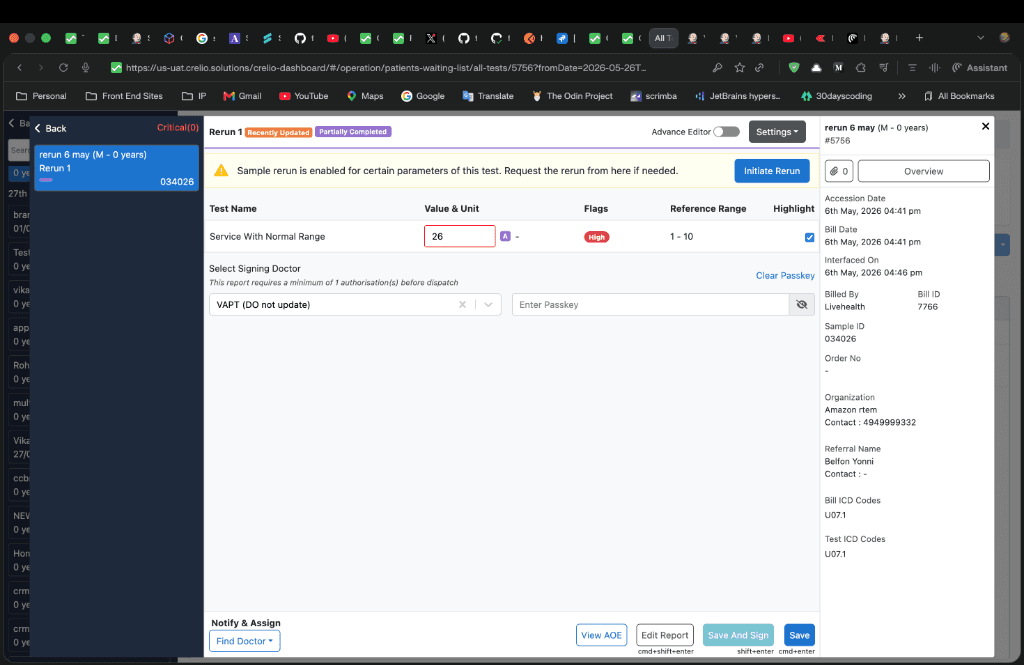
- Click "Initiate Rerun" → the
SampleRerunModalopens on the "Initiate Sample Rerun" tab - A table of parameters is shown with checkboxes — select the parameters to re-run
- If the report is already completed or signed, a confirmation warning appears requiring the user to type "confirm"
- Click "Initiate Sample Rerun" in the footer
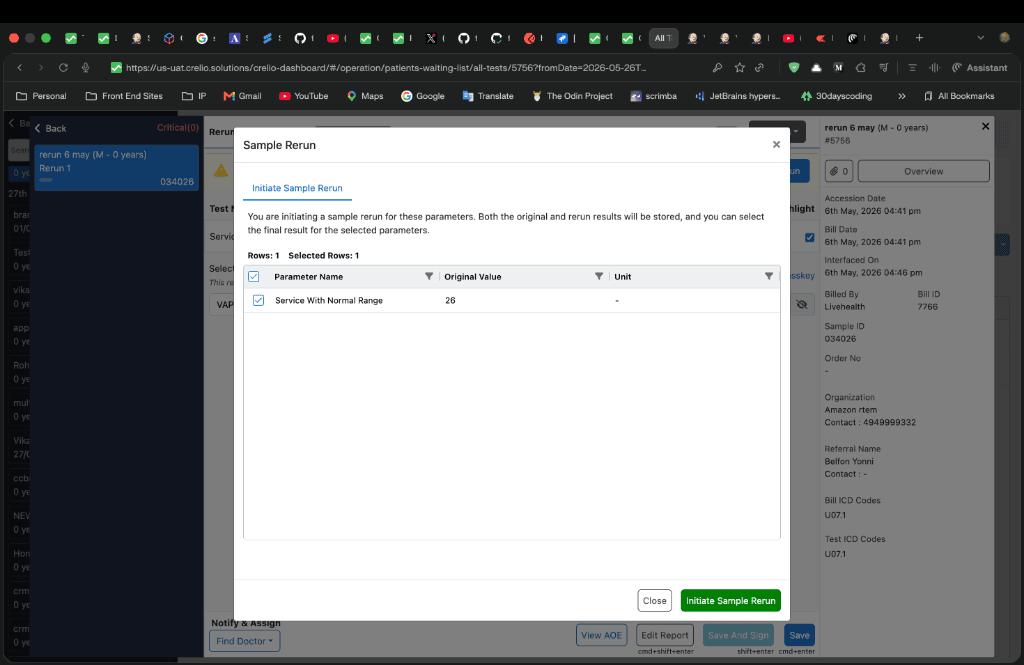
What happens on submit
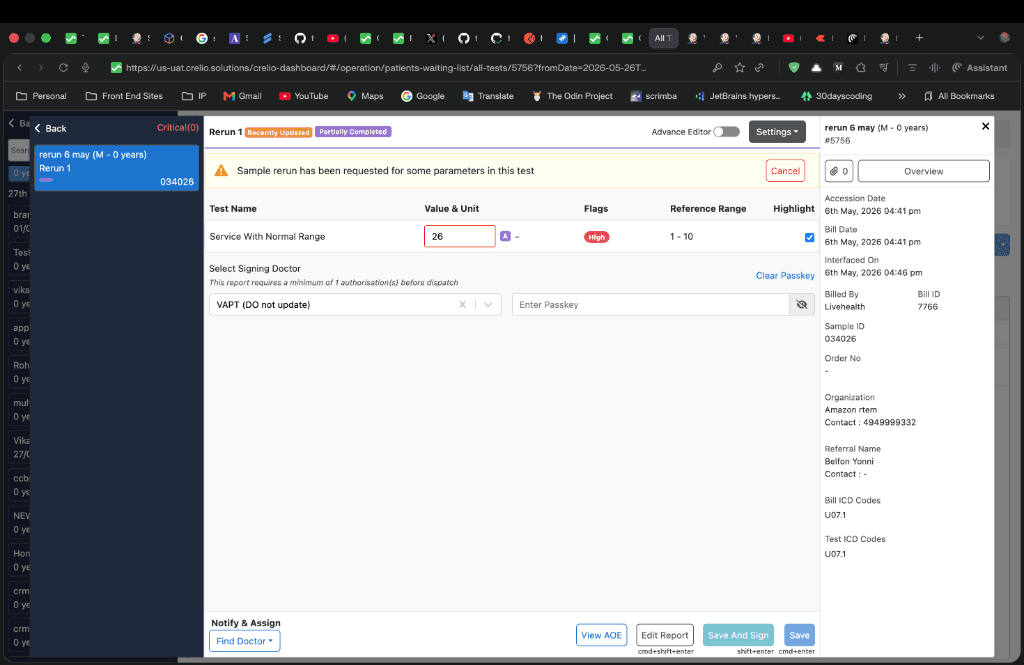
After the rerun is requested, the banner updates to show the rerun-requested state with a Cancel button:
Payload shape
{
  "type": "manual_rerun",
  "rerun_number": "1",
  "requested_parameters": [1, 3, 5],
  "parameter_names": ["WBC Count", "RBC Count", "Hemoglobin"],
  "is_active": true
}
2. Auto rerun
Auto rerun is configured per parameter in LabAdmin → Profile & Report Management → Test List → Rerun tab and triggers automatically when device values qualify.
Configuration
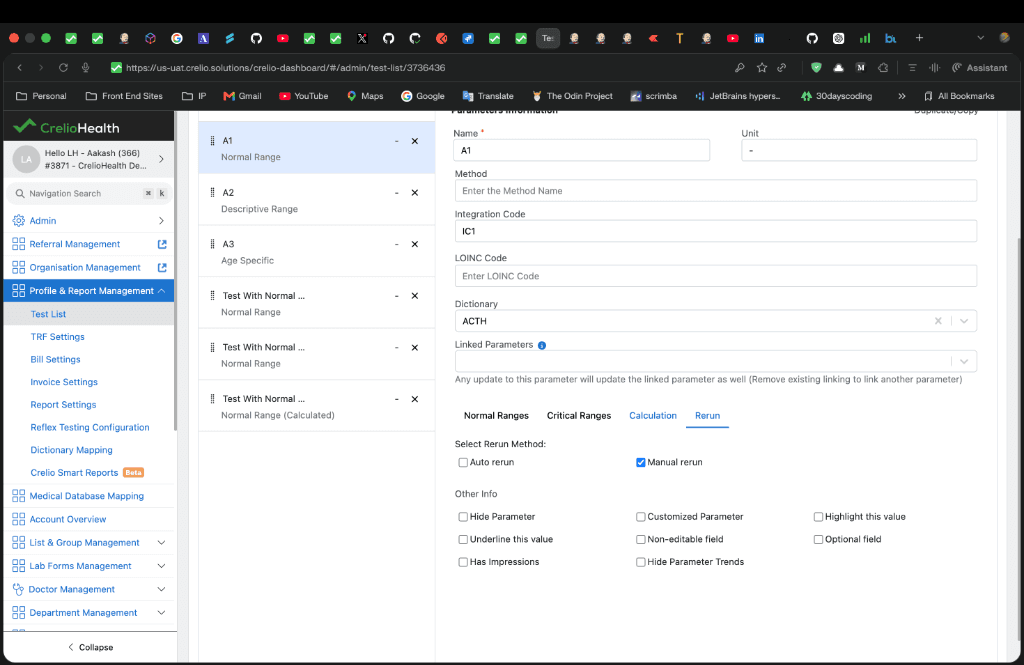
Each parameter can have auto_rerun enabled with a condition:
| Condition | Meaning |
|---|---|
Out of Normal Range (ABNORMAL) | Value falls outside normal reference range |
Critical Range (CRITICAL) | Value falls outside critical range |
Custom Range (CUSTOM) | Value falls outside user-defined custom bounds |
Trigger flow
Guard conditions
DOCUMENT_DB_ENABLEDmust betrue- At least one parameter must have
auto_rerunin itsReportFormat.meta - No existing auto rerun record for the same lab report (
auto_rerun_record_existscheck) - The parameter value must satisfy the configured condition against the appropriate range (normal, critical, custom, or age-based)
3. Instrument-triggered rerun
When an instrument re-sends results for a sample that already has a pending manual rerun, the system detects this and treats the new values as rerun data.
Detection logic (interfacing app)
The qualify_rerun() function in interfacing/src/main/tasks/sample_rerun.js:
- Checks if a manual rerun was requested by querying the WaitingList for the sample's
rerunNumber - If not a manual rerun, checks if
machine_triggered_rerunis enabled in device settings - Compares the processed timestamp or parsed values between the current and existing result
- Returns
{ is_rerun: true, rerun_number: -1 }for machine-triggered reruns
Prerequisite: The
machine_triggered_rerunfield must be set totruein the device settings JSON. If this field isfalseor absent, step 2 above will return early and the system will not detect instrument-triggered reruns. See Testing & Debugging for the full device settings example.
4. Receive rerun values
When rerun data arrives (via any trigger path), the SampleRerunView.post() dispatches to:
- Instrument-triggered (
rerun_number = -1):register_machine_triggered_rerun()— stores all values, marks fulfilled immediately - Manual (
rerun_number ≥ 1):register_manual_triggered_rerun()— validates against requested parameters, tracks partial fulfilment
Manual fulfilment tracking
5. Review and confirm rerun values
Once sampleRedrawFlag = 4, the RerunProgressComponent banner updates to "Sample rerun for this report is in progress. Please confirm the rerun values" with a "Confirm Rerun" button.
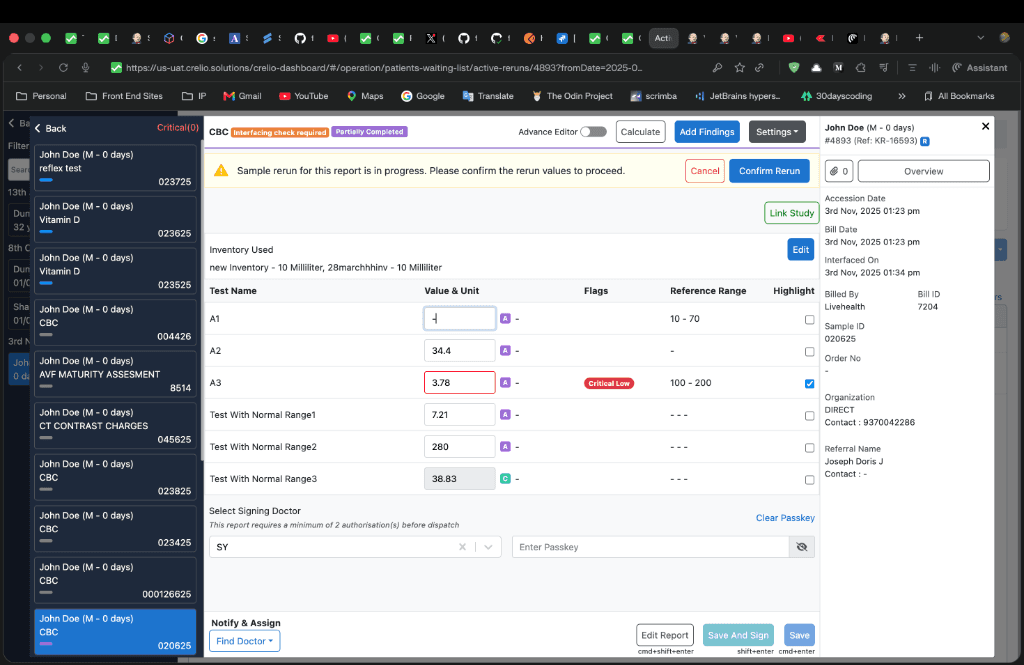
Steps
- Click "Confirm Rerun" → the
SampleRerunModalopens on the "Review Rerun Results" tab - A table shows each parameter with columns for the original value and each rerun value (value1, value2, etc.)
- Radio buttons on each row let the user pick which value to keep — original or a specific rerun iteration
- A header-level radio button selects all rows for a column at once
- Click "Confirm Rerun Values" in the footer
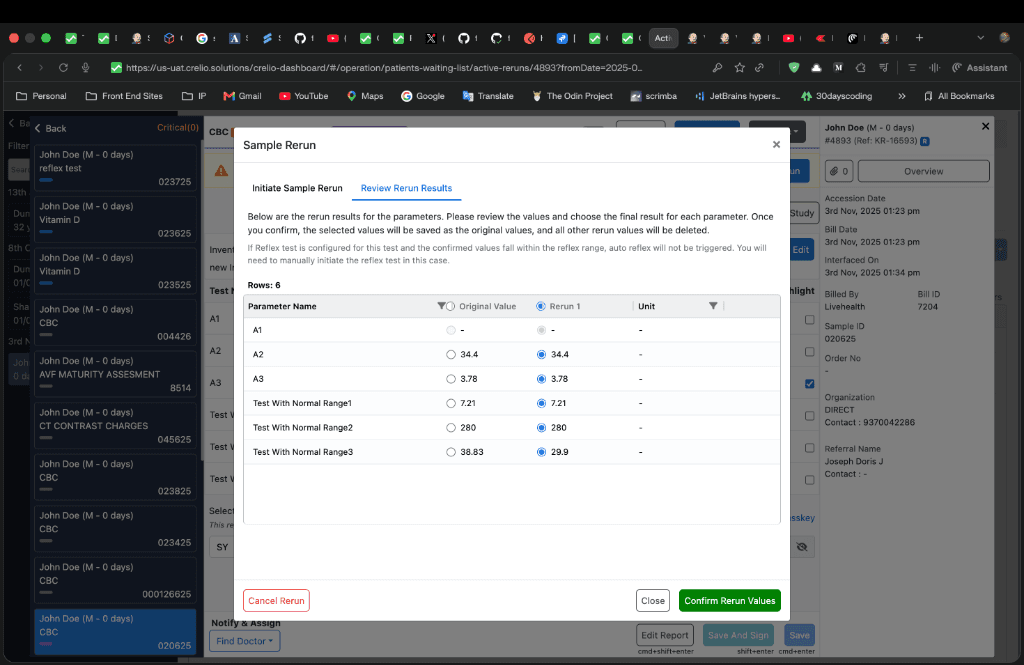
What happens on confirm
6. Cancel a rerun
A rerun can be cancelled at any stage — whether awaiting instrument values (flag = 3) or after values have been received (flag = 4).
Steps
- Click "Cancel" on the
RerunProgressComponentbanner → theCancelRerunModalopens - Confirmation message: "The sample rerun for this report is currently in progress. Are you sure you want to cancel?"
- Click "Cancel Rerun" to confirm
What happens on cancel
7. Report behaviour during an active rerun
While a rerun is in progress (sampleRedrawFlag = 3 or 4):
| Action | Behaviour |
|---|---|
| Save report | Blocked — footer shows "Rerun in progress, Confirm or cancel rerun to save or sign this report" |
| Sign report | Blocked — same message |
| Approve report | Blocked on doctor footer |
| Device Results Validation release | Parameter release proceeds normally; rerun state tracked separately |
| Waiting list | Report shows in "Active Reruns" filtered view |
| Completed tests query | Report excluded from completed tests count (ES filter sampleRedrawFlag ∈ [0,1,2,4]) |
8. Device waiting list integration
When a manual rerun is requested, the report appears in the device waiting list (interfacing app) with additional rerun metadata:
{
  "labReportId": 12345,
  "is_rerun_request": true,
  "rerun_number": 1,
  "rerun_params": "{\"42\": [\"HGB\", \"WBC\"]}"
}
The rerun_params field maps device IDs to the list of machine names (parameter codes) that need to be re-tested. This allows the interfacing app to send targeted rerun commands to the instrument.
9. Activity log reference
| Log Category ID | Constant | When logged |
|---|---|---|
979 | RERUN_VALUES_RECEIVED | Instrument sends rerun values for requested parameters |
980 | RERUN_VALUES_CONFIRMED | User confirms rerun values and replaces report values |
981 | RERUN_REQUESTED | Manual or auto rerun is requested |
984 | RERUN_FAILED | Rerun request fails (DocumentDB save error) |
985 | RERUN_CANCELLED | User cancels an in-progress rerun |
10. Testing & Debugging
UAT environment
Use the following UAT endpoint to trigger sample reruns for testing:
| Environment | URL | Lab ID |
|---|---|---|
| US UAT | https://us-uat.crelio.solutions/dataPartialFromDevice/ | 3871 |
| E2E | https://e2e-lhapp.crelio.solutions/dataPartialFromDevice/ | 22 |
The /dataPartialFromDevice/ endpoint is the interfacing entry point that processes partial device data. When is_rerun: true is set in the payload, the system treats the incoming data as rerun values.
Trigger an instrument-triggered rerun via curl
Use this curl command to simulate an instrument sending rerun data for an incomplete or partially completed report:
curl --location 'https://e2e-lhapp.crelio.solutions/dataPartialFromDevice/' \
--header 'App-Version: 9.9.99' \
--header 'Content-Type: text/plain' \
--header 'Cookie: DEPLOYMENT_ZONE=E2E; labUserId=' \
--data '{
    "labId": 22,
    "deviceAuth": "ffecd1a4-c330-4a50-b5d0-f9393a91e308",
    "data": {
        "values":[
            {
                "testName": "wbc",
                "value": 5
            },
            {
                "testName": "rbc",
                "value": 50
            },
            {
                "testName": "pc",
                "value": 500
            }
        ]
    },
    "sampleId": "BL000135924",
    "sample_id": "BL000135924",
    "is_rerun": true,
    "rerun_number": -1
}'
Payload field reference
| Field | Value | Purpose |
|---|---|---|
labId | 22 | Target lab identifier |
deviceAuth | ffecd1a4-c330-... | Device authentication token — maps to a specific device in the lab |
data.values | Array of { testName, value } | Parameter machine codes and their rerun values |
sampleId / sample_id | BL000135924 | The sample barcode to rerun (both fields sent for compatibility) |
is_rerun | true | Tells the system to treat this as a rerun rather than a fresh result |
rerun_number | -1 | Sentinel value for instrument-triggered rerun (see Design Decisions) |
Pre-conditions for testing
- The sample (
sampleId) must have an existing report in the system that is incomplete or partially completed (completedTests = 0orisPartialFill = 1) - The device identified by
deviceAuthmust be mapped to a lab and have test mappings that include the machine codes indata.values(e.g.,wbc,rbc,pc) - The report's
sampleRedrawFlagshould be0(no active rerun) for a first-time rerun, or3(rerun requested) for an in-progress manual rerun machine_triggered_rerunmust betruein the device settings — without this, the system will not treat incoming data as a rerun
Device settings for machine-triggered rerun
The device must have machine_triggered_rerun: true in its settings JSON. Below is a sample device settings object with the required field highlighted:
{
    "fileSettings": {
        "dir_path": "C:\\interfacing-cobas4800",
        "extensions": [
            "csv"
        ],
        "sheet_no_to_parse": [
            1
        ],
        "start_row_no": 1,
        "watch_timeout": 10000,
        "order_settings": {
            "output_dir": "C:\\interfacing-cobas4800",
            "filename": "test.txt"
        }
    },
    "timeout": 1000,
    "valuesMapping": [
        "value"
    ],
    "matchingKeywords": [
        {
            "reportFormatID": 4034153,
            "servername": "table",
            "machinename": "table"
        },
        {
            "reportFormatID": 4034153,
            "servername": "main_result",
            "machinename": "main_result"
        },
        {
            "reportFormatID": 4034153,
            "servername": "-",
            "machinename": "-"
        },
        {
            "reportFormatID": 4019571,
            "servername": "alb",
            "machinename": "alb"
        },
        {
            "reportFormatID": 4019571,
            "servername": "wbc",
            "machinename": "wbc"
        },
        {
            "reportFormatID": 4019571,
            "servername": "plt",
            "machinename": "plt"
        },
        {
            "reportFormatID": 4019571,
            "servername": "glu",
            "machinename": "glu"
        }
    ],
    "matchingKeywordsFlag": true,
    "keywordsToBeSentFlag": false,
    "interfaceType": "file",
    "autoSend": true,
    "initiate_order": false,
    "mark_sent_orders": false,
    "requires_ack": false,
    "machine_triggered_rerun": true  // ← Required for instrument-triggered reruns
}
Key field:
"machine_triggered_rerun": trueat the root level of the device settings. When this isfalseor absent, thequalify_rerun()function in the interfacing app will skip machine-triggered rerun detection and returnis_rerun: false.
What to expect
After sending the curl:
- The system saves
SampleRerunValuesin DocumentDB withrerun_type = "instrument_triggered"andrerun_number = -1 - The report's
sampleRedrawFlagis set to4(RERUN_RECEIVED) — the rerun is immediately marked as fulfilled for instrument-triggered reruns - Opening the report in the UI will show the
RerunProgressComponentbanner with "Sample rerun for this report is in progress. Please confirm the rerun values" - The Review Rerun Results tab will display the original values alongside the rerun values for side-by-side comparison
Overview
Sample Rerun — re-run lab test parameters on the same sample, triggered manually, automatically by configured conditions, or by the instrument itself.
Overview
Frontend implementation of Sample Rerun across livehealth-frontend and interfacing — component architecture, shared surfaces, and constants.