Components
Detailed component reference for Sample Rerun UI — modal, banner, LabAdmin configuration, and interfacing renderer components.
Component Reference
RerunProgressComponent
File: src/components/reusable/Modals/Report/RerunProgressComponent.tsx (166 lines)
The primary banner component rendered inside report entry and patient test list views. Shows contextual messages and action buttons based on the current sampleRedrawFlag.
Behaviour by state
sampleRedrawFlag | Banner message | Buttons |
|---|---|---|
0 (with manual_rerun enabled) | "Sample rerun is enabled for this report" | Initiate Rerun |
3 (RERUN_REQUESTED) | "Sample rerun has been requested..." | Cancel |
4 (RERUN_RECEIVED) | "Sample rerun for this report is in progress. Please confirm..." | Cancel, Confirm Rerun |
Children
Opens SampleRerunModal on "Initiate Rerun" or "Confirm Rerun" click, and CancelRerunModal on "Cancel" click.
Rendered in
src/components/reusable/Modals/Report/index.tsx(Report Entry modal)src/components/reusable/ParticularPatientsTestList/renderReports.tsx(Patient Test List)
SampleRerunModal
File: src/components/reusable/Modals/Report/SampleRerun/SampleRerunModal.tsx (211 lines)
Two-tab modal that handles both initiation and review of sample reruns.
Tabs
| Tab | Component | When visible |
|---|---|---|
| Initiate Sample Rerun | InitiateSampleRerun | Always (tab 1) |
| Review Rerun Results | ReviewRerunResults | When sampleRedrawFlag ∈ {3, 4} |
Props
interface SampleRerunModalProps {
  reportViewData: any;
  manualRerunList: any[];
  selectedReport: any;
  updatedRedrawFlag: number;
  sampleRerunModalHandler: () => void;
  cancelRerunModalHandler: () => void;
  afterConfirm: () => void;
  onClose: () => void;
  accessedFromDeviceResultsValidation: boolean;
}
Footer actions
| Button | Condition | Action |
|---|---|---|
| Initiate Sample Rerun | Tab 1 active | Calls requestRerun() with selected parameters |
| Confirm Rerun Values | Tab 2 active | Calls confirmRerunResults() with user-selected values |
| Cancel Rerun | Tab 2 active | Opens CancelRerunModal |
| Close | Always | Closes modal |
Completed report guard
When the report is already completed or signed, a text input appears requiring the user to type "confirm" before the "Initiate Sample Rerun" button becomes active. This prevents accidental re-runs on finalised reports.
InitiateSampleRerun
File: src/components/reusable/Modals/Report/SampleRerun/InitiateSampleRerun.tsx (151 lines)
AgGrid table with checkboxes for selecting parameters to re-run.
Columns
| Column | Source |
|---|---|
| ☑ (checkbox) | Row selection |
| Parameter Name | testName from ReportFormat |
| Original Value | Current value from ReportValue |
| Unit | Parameter unit |
Row behaviour
- Rows with empty or
"-"values are non-selectable (greyed out) - Only parameters with
manual_rerunenabled in their meta are shown - A warning banner appears if the report status is completed, partially-signed, or signed
ReviewRerunResults
File: src/components/reusable/Modals/Report/SampleRerun/ReviewRerunResults.tsx (224 lines)
AgGrid with radio buttons for choosing between original and rerun values.
Columns
| Column | Source |
|---|---|
| Parameter Name | testName |
| Original Value | Current ReportValue |
| Value 1 (rerun 1) | First rerun from SampleRerunValues |
| Value 2 (rerun 2) | Second rerun (if exists) |
| ... | Additional reruns |
Radio selection
- Each row has a radio button per column (original, value1, value2, ...)
- Radio state stored in Redux:
parameterwiseSelectedValue - Header-level radio buttons use
AllSelectedContextto select an entire column at once handleSelectionChange()updates individual selectionshandleHeaderSelection()selects all rows for a columnisAllRowsSelected()checks if header radio should be active
Data flow
Reflex test note
An info message warns the user: if reflex tests are configured for the report, confirming rerun values may re-trigger reflex logic.
CancelRerunModal
File: src/components/reusable/Modals/Report/SampleRerun/CancelRerunModal.tsx (79 lines)
Simple confirmation modal for cancelling an in-progress rerun.
Message
"The sample rerun for this report is currently in progress. Are you sure you want to cancel?"
Action
Calls cancelRerun(labReportId) which posts to POST /sample-rerun/{id}/abort.
LabAdmin — Sample Rerun Configuration
File: src/components/LabAdmin/AddEditReport/components/SampleRerun/index.tsx (145 lines)
Configuration UI rendered in LabAdmin → Profile & Report Management → Test List → Rerun tab. Allows enabling and configuring auto/manual rerun per parameter.
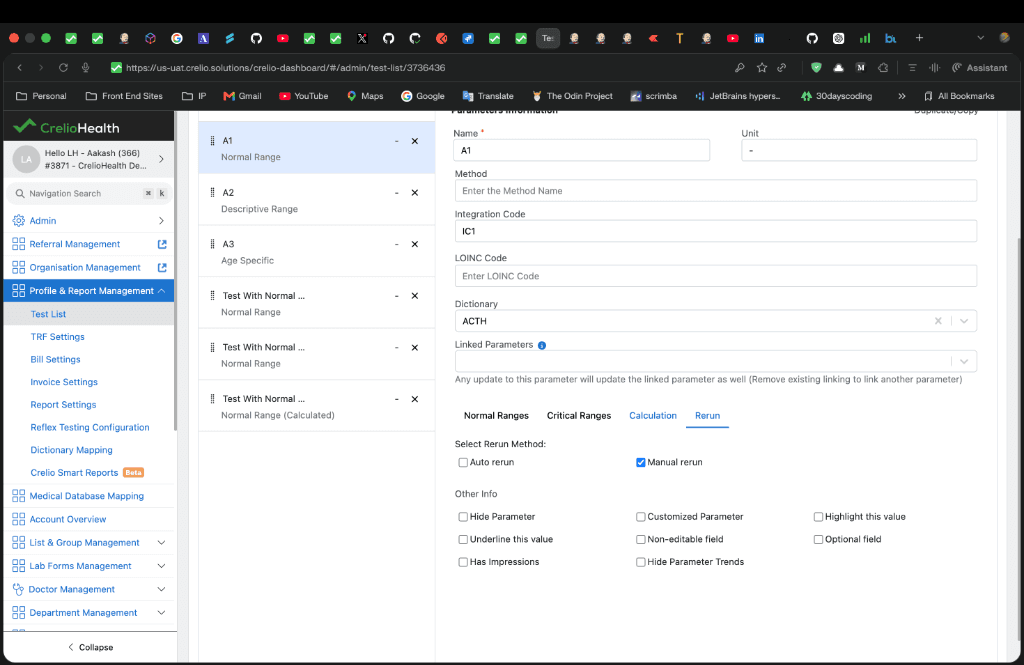
Configuration options
Constants
File: src/components/LabAdmin/AddEditReport/components/SampleRerun/constants.ts
export const SAMPLE_RERUN_METHOD = [
  { label: "Auto rerun", id: "auto_rerun" },
  { label: "Manual rerun", id: "manual_rerun" },
];

export const PARAMETER_RESULT_VALUES = [
  { label: "Out of Normal Range", key: "ABNORMAL" },
  { label: "Critical Range", key: "CRITICAL" },
  { label: "Custom Range", key: "CUSTOM" },
];
Range sub-components
When auto_rerun is enabled, the appropriate range component is rendered with isSampleRerun={true}:
| Component | Condition |
|---|---|
NormalRanges / AgeBasedRangesTab | ABNORMAL selected |
CriticalRanges | CRITICAL selected |
CustomRanges | CUSTOM selected |
DescriptiveNormalRange | Descriptive parameters |
Meta persistence
File: src/components/LabAdmin/Utils/helpers.ts
The shouldPreserveMetaForRerun() function checks if auto_rerun, instrument_triggered, or manual_rerun is enabled in the parameter's meta. When saving, these fields are preserved to prevent accidental removal.
Device Management — Manual Rerun Toggle
File: src/components/Operations/DeviceManagement/utils/helpers.ts
The setManualRerun(index) function toggles the manual_rerun flag in the device test mapping meta. This controls whether a parameter can be manually re-run from the device management view.
File: src/components/Operations/DeviceManagement/container/DeviceTestMapping.tsx
A "Manual Rerun" checkbox column is added to the AgGrid in the device test mapping screen, using manualRerunCellRender.
Test Waiting List — Status Badges
File: src/components/reusable/TestWaitingList/TestInfoCard.tsx
sampleRedrawFlag | Badge label |
|---|---|
4 | "Rerun Received" |
3 | "Rerun Requested" |
Interfacing Renderer Components
Waiting list item
File: src/renderer/components/layout/listview/item.jsx
Displays a "Rerun" badge label next to the Sample ID when rerunNumber is set (excluding 0, -1, null, undefined).
Report values form
File: src/renderer/components/pages/report_values/report_values_form.jsx
When machine_triggered_rerun === 1, the parameter's status is set to "Rerun" with red styling.
Report values list
File: src/renderer/listview_settings/report_values.js
Shows a "Rerun" label on the report values list view when machine_triggered_rerun is truthy.
Input control
File: src/renderer/components/controls/input.jsx
Applies rerun_label_style and rerun_status_style when the status is "Rerun".