Frontend
Component structure, state management, and interaction patterns for the Reflex Test Configuration UI in livehealth-frontend.
Drug Reflex Configuration Components
The Toxicology Reflex workflow begins with configuring related drugs for a primary drug.
This functionality is implemented using multiple frontend components that work together to:
- Open the Drug configuration modal
- Manage related drug relationships
- Validate relationship data
- Save reflex relationships
- Handle unsaved changes and updates
Component Overview
| Component | Responsibility |
|---|---|
DrugMaster | Main container responsible for rendering the Drug list and opening Create/Edit modal |
CreateDrug | Main modal component for creating and updating drugs |
RelatedDrugs | Handles addition, update, and deletion of reflex drug relationships |
helpers.ts | Contains utility functions, validation logic, API integration, and relationship processing |
1. DrugMaster Container
Location
src/components/reusable/Drug/container/index.tsxResponsibility
DrugMaster acts as the primary container component for the Drug module.
It is responsible for:
- Rendering drug list views
- Managing tabs
- Fetching drug data
- Opening Create/Edit Drug modal
- Loading related drug relationships
- Managing enable/disable workflows
Modal Rendering Flow
When a row is clicked from the Drug list:
onRowClickHandler={(selectedData: any) => {
    fetchRelatedDrugs(selectedData?.id, setRelatedDrugLoading);
    setIsCreateDrug(false);
    gridActionHandler({ value: 1, label: t("Edit") }, selectedData);
}}
The container:
- Fetches related drugs
- Stores relationship data in Redux
- Opens the
CreateDrugmodal
Related Drug Loading
Before opening the modal, the component calls:
fetchRelatedDrugs(selectedData?.id, setRelatedDrugLoading);This ensures:
- Existing reflex relationships are loaded
- Relationship data is available inside
RelatedDrugs
CreateDrug Modal Rendering
{!!createDrugModal && (
    <CreateDrug
        closeModal={() => {
        clear();
        }}
        isOpen={createDrugModal}
        ModelTitle={getModalTitle(
        t("Create Drug"),
        t(`${"Update Drug"} - ${selectedData?.name}`),
        t(`${"System Defaults Drug"} - ${selectedData?.name}`),
        t("Create Custom Drug"),
        t(`${"Update Custom Drug"} - ${selectedData?.name}`),
        selectedTab,
        selectedData,
        "System Defaults",
        "Custom Drug"
        )}
        selectedData={selectedData}
        selectedDrugTab={selectedTab}
        isCreate={isCreateDrug}
        relatedDrugLoading={relatedDrugLoading}
    />
)}
The modal receives:
- Selected drug data
- Current tab information
- Related drug loading state
- Create/Edit state
2. CreateDrug Component
Location
src/components/reusable/Drug/components/CreateDrug/index.tsxResponsibility
CreateDrug is the primary modal component used for:
- Creating drugs
- Updating drugs
- Managing related drug relationships
- Handling unsaved changes
The component contains two major tabs:
- Content
- Related Drugs
Tab Structure
<Tabs
    items={[
        {
            label: t("Content"),
        },
        {
            label: t("Related Drugs"),
        },
    ]}
/>
Related Drugs Tab
The Related Drugs tab renders:
<RelatedDrugs selectedData={selectedData} />This tab becomes available only when:
- The drug already exists
- Drug has an ID
disabled: !selectedData.hasOwnProperty("id")This prevents configuring relationships before the primary drug is created.
Unsaved Changes Handling
The component includes logic to prevent accidental loss of relationship data.
Before:
- Closing modal
- Switching tabs
- Cancelling changes
The system checks:
isUnsavedChanges()If unsaved changes exist:
- Confirmation modal is shown
- User can save before leaving
Save Flow
When saving related drugs:
saveAndUpdateDrugRelationship(
    drugId,
    relatedDrugRelationshipArray,
    initialRelatedDrugs,
    t
);
The component:
- Validates duplicate relationships
- Validates empty relationships
- Creates primary drug if needed
- Saves relationship mappings
3. RelatedDrugs Component
Location
src/components/reusable/Drug/components/CreateDrug/RelatedDrugs.tsxResponsibility
RelatedDrugs manages the complete reflex relationship workflow for a drug.
It allows users to:
- Search drugs
- Add related drugs
- Configure relationship types
- Remove relationships
- Update reflex configurations
Drug Selection
Drug selection is implemented using:
<SingleMultiSelect />The component supports:
- Multi selection
- Searchable drug list
- Custom option rendering
Add Relationship Flow
When user clicks:
handleAddButtonClick(
    selectedDrugs,
    relatedDrugRelationshipArray,
    dispatch
);
The helper:
- Merges selected drugs
- Generates temporary serial numbers
- Prevents duplicate entries
Relationship Configuration
Each added drug contains a relationship selector:
<SingleMultiSelect
    options={translationObj.drugRelationship}
/>
Users can configure:
- Reflex
- Other relationship types
For Toxicology Reflex:
- Relationship must be
Reflex
Validation Handling
Relationship dropdown highlights invalid states using:
borderColor:
    inst["isDuplicate"] || inst["isEmpty"]
Validation states:
- Duplicate relationship
- Empty relationship
Remove Relationship Workflow
Removing a relationship opens a confirmation modal.
On confirmation:
removeDrugRelationship(
    selectInst,
    relatedDrugRelationshipArray,
    initialRelatedDrugs,
    dispatch
);
The helper:
- Removes temporary entries locally
- Calls delete API for persisted relationships
4. Helper Functions
Location
src/components/reusable/Drug/utils/helpers.tsResponsibility
This file contains all shared business logic used by the Drug Reflex workflow.
It handles:
- API integration
- Relationship management
- Validation
- Redux updates
- Drug transformation
- Duplicate checks
Important Helper Functions
fetchRelatedDrugs
Fetches all related drugs for the selected primary drug.
fetchRelatedDrugs(selectedData?.id, setRelatedDrugLoading);getRelatedDrugsById
Calls API:
/api-v3/related-drugs/{id}Processes response and stores:
- relatedDrugRelationshipArray
- initialRelatedDrugs
inside Redux state.
saveAndUpdateDrugRelationship
Handles:
- Creating relationships
- Updating relationships
API selection depends on existing relationships:
/api-v3/related-drugs/new
/api-v3/related-drugs/update
removeDrugRelationship
Handles:
- Local removal
- Persisted deletion
Delete API:
/api-v3/related-drugs/delete/{id}checkDuplicateAndEmpty
Validates:
- Duplicate relationships
- Missing relationship type
Used before saving reflex configuration.
isUnsavedChanges
Compares:
- Initial relationship state
- Current relationship state
Used to prevent accidental data loss.
Redux State Usage
The workflow heavily depends on Generic Redux state.
Important States
| State | Purpose |
|---|---|
relatedDrugRelationshipArray | Current relationship list |
initialRelatedDrugs | Original fetched relationships |
selectedDrugs | Currently selected drugs |
selectedTab | Active CreateDrug tab |
Reflex Workflow Summary
DrugMaster
    ↓
Open CreateDrug Modal
    ↓
Load RelatedDrugs Tab
    ↓
Fetch Existing Relationships
    ↓
Add / Update Reflex Drugs
    ↓
Validate Relationships
    ↓
Save Relationship Mapping
Important Notes
- Reflex configuration is only available after the drug is created
- Relationship validation prevents duplicate reflex mappings
- Redux is used to preserve modal state across interactions
- Unsaved change detection prevents accidental loss of configurations
- Relationship APIs are separated into create, update, and delete operations
Reflex Settings Configuration
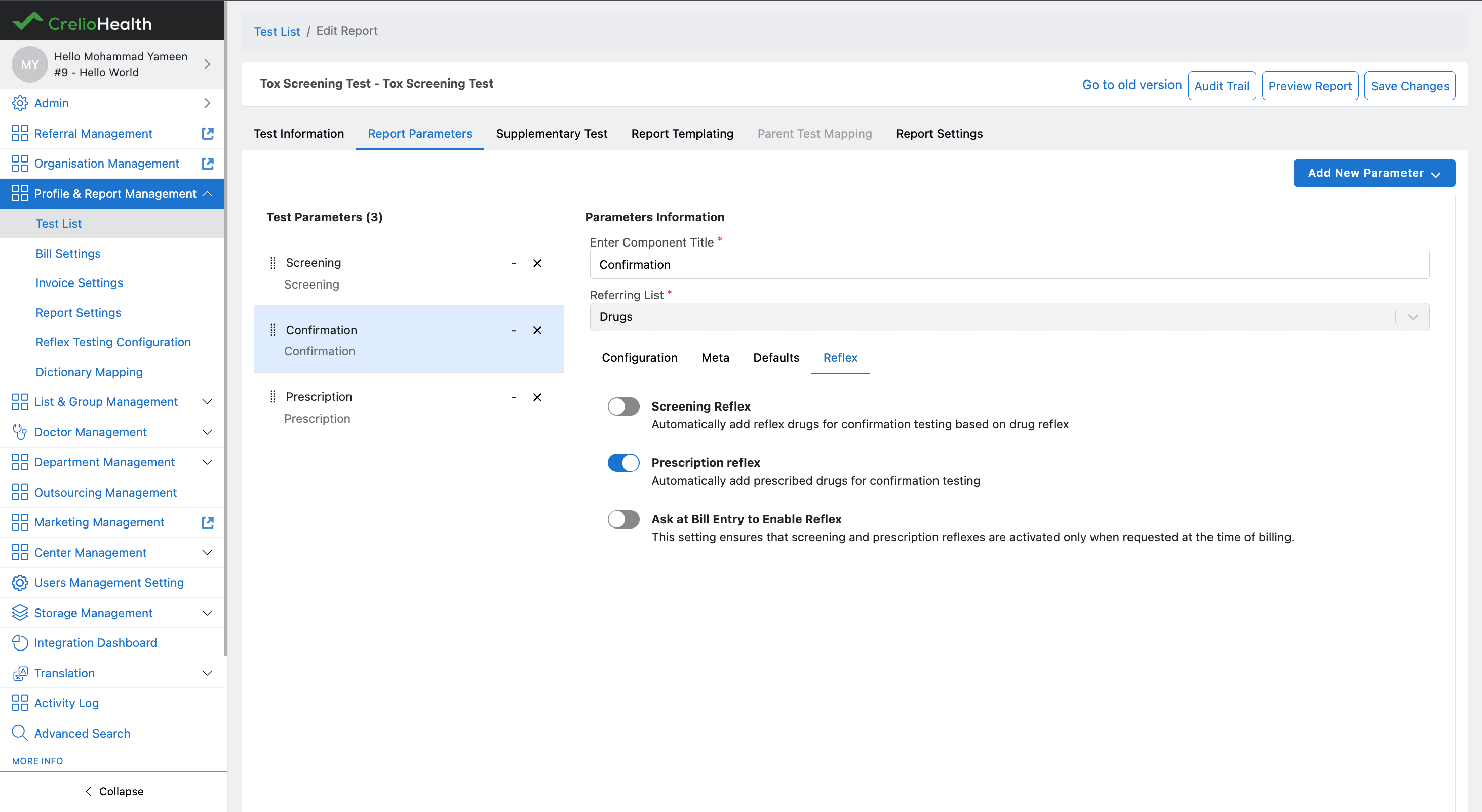
The Reflex Settings configuration allows users to control how Toxicology reflex workflows behave during billing and confirmation processing.
These settings are configured inside the Confirmation Component under the Reflex tab.
The configuration supports:
- Screening Reflex
- Prescription Reflex
- Ask at Bill Entry workflow
Component Overview
| Component | Responsibility |
|---|---|
Screening | Main Add/Edit Report parameter container |
Reflex | Handles rendering and updating reflex toggles |
1. Screening Component
Location
src/components/LabAdmin/AddEditReport/components/Screening/index.tsxResponsibility
The Screening component is the main container responsible for rendering report parameter configuration tabs inside the Add/Edit Report workflow.
It manages:
- Configuration settings
- Meta configuration
- Default values
- Reflex settings
Reflex Tab Rendering
The Reflex tab is conditionally rendered only for supported Toxicology component types.
formInput?.type === 16When the condition is satisfied:
{
    label: t("Reflex"),
    TabComponent: (
        <Reflex
            formInput={formInput}
            updateReportParameter={updateReportParameter}
        />
    ),
}
This ensures:
- Reflex configuration is available only for Toxicology workflows
- Unsupported component types do not render Reflex settings
Tabs Structure
The component renders multiple tabs using:
### Tab Structure

```tsx
<Tabs
    items={[
        {
            label: t("Configuration"),
        },
        {
            label: t("Meta"),
        },
        {
            label: t("Defaults"),
        },
        {
            label: t("Reflex"),
        }

    ]}
/>
The Reflex tab is responsible for all reflex-related workflow configuration.
Data Flow
The component passes two important props to the Reflex component:
<Reflex
    formInput={formInput}
    updateReportParameter={updateReportParameter}
/>
Props
| Prop | Purpose |
|---|---|
formInput | Contains current report parameter configuration |
updateReportParameter | Updates report parameter state |
2. Reflex Component
Location
src/components/LabAdmin/AddEditReport/reusable/Reflex/index.tsxResponsibility
The Reflex component handles enabling and disabling reflex workflows using toggle-based configuration.
It allows users to configure:
- Screening Reflex
- Prescription Reflex
- Ask at Bill Entry to Enable Reflex
Reflex Options Rendering
All reflex options are dynamically rendered using:
translationObj.reflexOptions?.map(...)This provides:
- Centralized configuration
- Dynamic rendering
- Easier extensibility for future reflex options
Toggle State Management
Each toggle updates the meta object inside the report parameter configuration.
onChange={(value: any) => {
    const newMeta: any = { ...meta };
    newMeta[ins?.id] = value ? 1 : 0;
    updateReportParameter({ meta: newMeta });
}}
Meta Configuration Structure
The component stores reflex settings inside:
formInput.metaExample:
{
    "screening_reflex_enabled": 1,
    "prescription_reflex_enabled": 1,
    "ask_at_order_reflex_enable": 0
}
Reflex Setting Options Source
The toggle configuration is controlled through:
translationObj.reflexOptions = [
    {
      label: i18n.t("Screening Reflex"),
      subText: i18n.t(
        "Automatically add reflex drugs for confirmation testing based on drug reflex"
      ),
      value: 0,
      id: "screening_reflex_enabled",
      isDisabled: false,
    },
    {
      label: i18n.t("Prescription reflex"),
      subText: i18n.t("Automatically add prescribed drugs for confirmation testing"),
      value: 0,
      id: "prescription_reflex_enabled",
      isDisabled: false,
    },
    {
      label: i18n.t("Ask at Bill Entry to Enable Reflex"),
      subText: i18n.t(
        "This setting ensures that screening and prescription reflexes are activated only when requested at the time of billing."
      ),
      value: 0,
      id: "ask_at_order_reflex_enable",
      isDisabled: false,
    },
]
State Update Flow
Toggle Switch Changed
    ↓
Clone Existing Meta
    ↓
Update Reflex Key
    ↓
Call updateReportParameter()
    ↓
Persist Report Parameter State
Important Notes
- Reflex settings are stored inside report parameter meta configuration
- Reflex workflows are enabled per Confirmation component
- Screening and Prescription reflex workflows can operate independently
- Ask at Bill Entry provides billing-time control over reflex execution
- Dynamic rendering allows future reflex options to be added without modifying component structure
Drug Addition At Billing
Add Drugs Modal
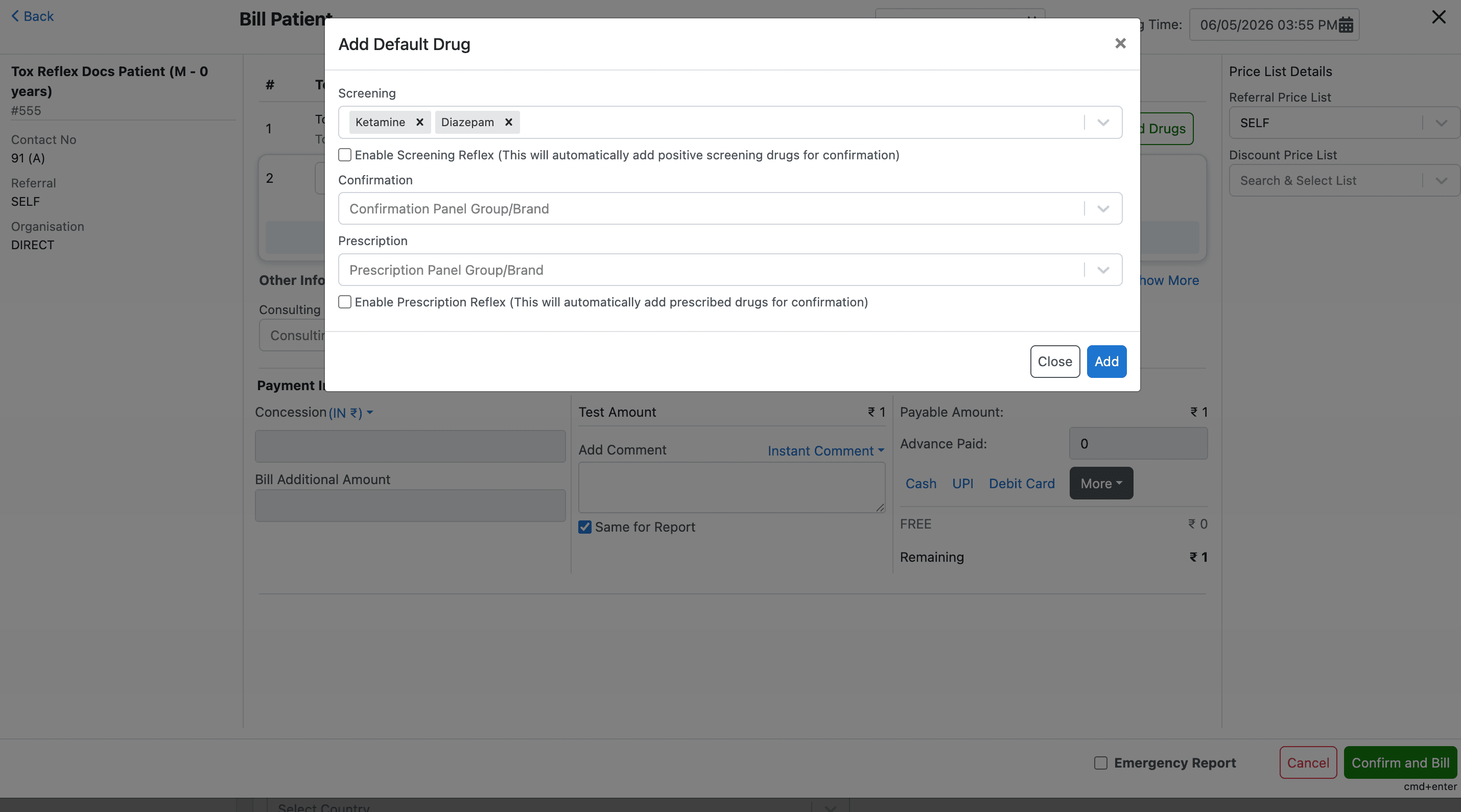
The Add Drugs modal is responsible for allowing users to add and manage Toxicology drugs during the billing workflow.
This modal is opened when the user clicks the Add Drugs button for a test during billing.
The workflow supports:
- Screening drugs
- Confirmation drugs
- Prescription drugs
- Reflex enablement during billing
Component Overview
| Component | Responsibility |
|---|---|
TestDisplayField | Main billing test row component |
AvailableAtBilling | Modal for adding and managing drugs during billing |
1. TestDisplayField Component
Location
src/components/reusable/Billing/components/TestDisplayField.tsxResponsibility
The TestDisplayField component represents an individual test row inside the billing screen.
It manages:
- Test rendering
- Pricing
- ICD selection
- Quantity updates
- Sample selection
- Drug configuration during billing
Opening the Add Drugs Modal
The Add Drugs modal is triggered from the billing test row.
The component dispatches:
dispatch(
    setGenericState({
        defaultDrugModel: true,
        copyTestDetails: testDetails,
    })
);
This:
- Opens the modal
- Stores the currently selected test details
Modal State Management
The modal visibility is controlled through Redux state:
defaultDrugModelThe selected test data is stored in:
copyTestDetails2. AvailableAtBilling Component
Location
src/components/reusable/Billing/components/AvailableAtBilling.tsxResponsibility
The AvailableAtBilling component manages:
- Drug selection during billing
- Reflex enablement at order time
- Screening drug selection
- Confirmation drug selection
- Prescription drug selection
It acts as the primary billing-time Toxicology workflow component.
Supported Components
The modal supports:
| Component Type | Purpose |
|---|---|
SCREENING | Add screening drugs |
CONFIRMATION | Add confirmation drugs |
PRESCRIPTION | Add prescription drugs |
Component Data Loading
The component loads configuration using:
getInstanceId(reportFormatById, testDetails, billTestList, dispatch)This prepares:
- Screening components
- Confirmation components
- Prescription components
Internal Component State
The modal maintains separate state for each drug category.
const [screeing, setScreeing] = useState<any>([]);
const [confirmation, setConfirmation] = useState<any>([]);
const [prescription, setPrescription] = useState<any>([]);
Reflex Enablement at Billing
The modal supports enabling reflex workflows during billing.
These states are managed using:
testIdToReflexEnableStatusAtOrderMapBilling-Time Reflex Controls
The following billing-time reflex controls are supported:
| Reflex Type | Purpose |
|---|---|
enableScreeningReflexAtOrder | Enables Screening Reflex during billing |
enablePrescriptionReflexAtOrder | Enables Prescription Reflex during billing |
Reflex Enablement Logic
The component checks Confirmation component metadata:
meta?.screening_reflex_enabled
meta?.prescription_reflex_enabled
meta?.ask_at_order_reflex_enable
This determines whether reflex checkboxes should be shown during billing.
Drug Selection Components
The modal renders separate components for each workflow.
| Component | Responsibility |
|---|---|
ScreeningPanelGroup | Screening drug selection |
ConfirmationPanelGroup | Confirmation drug selection |
PrescriptionPanelGroup | Prescription drug selection |
Reflex Auto Enablement
The component can automatically enable reflex workflows when:
- Selected panels contain reflex-enabled drugs
- Prescription drugs require reflex processing
Example:
forceScreeningReflexCheck
forcePrescriptionReflexCheck
Add Action
The Add button:
- Persists selected drugs
- Updates report format data
- Closes the modal
Redux State Dependencies
The component heavily relies on Redux state.
Important states include:
| State | Purpose |
|---|---|
billTestList | Current billing test list |
reportFormatById | Report parameter configuration |
defaultDrugModel | Modal visibility |
copyTestDetails | Current selected test |
testIdToReflexEnableStatusAtOrderMap | Billing reflex state |
Important Helper Functions
| Function | Purpose |
|---|---|
getInstanceId | Loads report parameter instances |
updateDrugsOnChange | Normalizes selected drugs |
updateDefaultDrugList | Persists selected drugs |
setReflexEnableStatusAtOrderForDefaultDrugs | Enables reflex during billing |
findDrugsMetabolitesAndFill | Auto-fills metabolite drugs |
Available During Billing Workflow
The modal only renders components marked with:
available_at_billing = trueIf disabled:
- Users cannot add drugs during billing
- Only default configured drugs are used
Important Notes
- The modal is the central Toxicology billing workflow component
- Reflex workflows can be controlled during billing
- Screening and Prescription workflows are handled independently
- Drug selections are persisted in Redux state
- Reflex enablement depends on Confirmation component configuration
- Components render dynamically based on report parameter configuration
- Available During Billing controls whether users can manually add drugs
Overview
Toxicology Reflex Management automates confirmation workflows by dynamically adding reflex and prescription drugs into Confirmation based on billing configuration and device results.
Backend
API contract, database changes, business logic orchestration, and integration points for the Reflex Management backend in crelio-app.