Workflow Guide
Step-by-step operator and developer workflow for Missing Details.
Workflow Guide
This section provides a practical walkthrough that gives context to understand the feature's behavior without digging through implementation details.
Configuring (Enabling/Disabling) The Missing Details Default Values
The configuration UI lives under advanced registration settings and is the source of truth for which fields can be marked missing.
Where the user goes
- Open the registration settings / advanced settings area.
- Look for the section labeled
Registration/Order Creation With Missing Details. - If nothing is configured yet, the button shown is
Enable. - If configs already exist, the buttons shown are
EditandDisable.
Source references:
What the buttons do
| Button | What it does | Frontend path | Backend path |
|---|---|---|---|
Enable | Opens the Missing Details modal with no existing lab config | setToggleModal(true) | No API yet |
Edit | Opens the same modal preloaded with current active config | loadData() in MissingDetailsModal | GET /api-v3/registration/patients/lab-missing-details-config |
Disable | Opens a confirmation modal and soft-disables all active configs | handleDisableAll | POST /api-v3/registration/patients/lab-missing-details-config with disable_all=true |
Cancel | Closes the modal without saving | modal state only | No API |
What happens inside the Missing Details modal
- The frontend calls
getTemplates()to fetchMissingDetailsTemplates. - In parallel it calls
getLabConfigs()to fetch the current active lab config. - The modal shows:
- a category dropdown,
- a field selector with
Select All, - a table of selected fields,
- a
Default Value If Missingcolumn, - action icons for edit/remove.
- The operator can:
- add one field,
- add all fields in the filtered category,
- edit a default value,
- remove a field from active config.
Validation checks before save
These checks happen in the frontend before saveLabConfigs(...) posts the payload.
| Check | Rule | Why it exists | Source |
|---|---|---|---|
| MRN validation | Patient ID (MRN) only allows [A-Za-z0-9\\s\\-\\.,]+ | Prevent garbage placeholder values for a high-signal identifier | MissingDetailsModal.tsx, MissingDetailsHelpers.ts |
| Email validation | Email must pass EMAIL_REGEX | Avoid storing broken email defaults | constants.ts |
| Date validation | Date-type defaults must parse as ISO-compatible dates | Date of Birth and similar defaults need a valid date string | MissingDetailsModal.tsx |
| Non-editable field guard | Certain fields cannot be edited once configured | These fields are intended to map to catalog/entity semantics rather than arbitrary free text | NON_EDITABLE_FIELD_NAMES |
Fields that are effectively non-editable after config exists
The UI disables default-value editing for fields listed in NON_EDITABLE_FIELD_NAMES. These include items like Clinical History, Allergies, Referral, Organization, Test, Bill ICD codes, Consulting doctor, and a few more.
Save payload structure
The modal computes three buckets before save:
| Bucket | Meaning |
|---|---|
create | New lab configs not currently active |
update | Existing configs whose value or metadata changed |
disabled_ids | Existing active configs removed by the user |
Posted to:
POST /api-v3/registration/patients/lab-missing-details-config
Backend behavior on config save
The PY-3 config view performs these steps:
- Resolve
lab_idfrom session. - Validate payload with
LabMissingDetailsBulkUpdateSerializer. - Create new
LabMissingDetailsConfigurationrows for genuinely new templates. - Soft-disable rows listed in
disabled_ids. - Bulk-update changed rows.
- For each created config, call
LabMissingDetailsConfiguration.process_field(...).
process_field(...) decides whether the configured default is plain data or a real entity that the system should create somewhere else. For example, referrals, organizations, tests, and some insurance/group entities may be created or queued for creation.
Enabling vs disabling in real DB terms
This is not hard delete.
| Action | DB behavior |
|---|---|
| Enable/add field | Create a LabMissingDetailsConfiguration row |
| Edit field | Update the same active row |
| Disable one field | Set is_disabled = 1 on that row |
| Disable all | Bulk update all active rows for the lab to is_disabled = 1 |
Registering A Patient With Missing Details
The operator flow in registration
- Open the patient registration form.
- The frontend loads
labMissingDetailsConfigurationinto model state throughfetchLabMissingDetailsConfiguration(...). - For configured fields, the UI can show a
Missingcheckbox near the field. - The operator clicks the
Missingcheckbox. MissingFieldCustomCheckBoximmediately updates:missingFieldState[field] = truemissingFieldUIVisible[field] = false
- The checkbox's
onTogglehandler callshandleMissingToggle(...). handleMissingToggle(...)looks up the configured default value and config id.- The correct form field is populated.
- The helper persists:
missingFieldSavedValue[field] = injected valuemissingFieldConfigUsed[field] = config id
- The visible UI switches from the checkbox to a
Missing Datalabel in many places.
What happens if the user later types a real value
If the field was marked missing and the current form value no longer matches the injected saved value, the frontend clears the missing state via checkAndResetMissingField(...).
Registration submit payload
When patient registration is submitted, the payload carries the selected missing config ids (e.g., labMissingDetailsIds, labMissingFieldIds).
Backend registration path
In PY-3:
- Patient save lands in
UserDetails.after_save(...). build_value_mapper(self, insurance_details)converts the saved object into a flat string map of fields.create_or_update_missing_details_entries(...)is called withlab_missing_field_ids,lab_id,user_details_id, and context.- The function decides whether to create new unresolved rows or resolve existing ones.
Registering / Updating An Order With Missing Details
Order-level missing fields follow the same idea but run through billing/update surfaces instead of pure patient registration.
Typical order-level examples include Test, Order Number, Report Remark, Bill ICD codes, Test ICD codes, Consulting doctor.
Billing flows populate missingFieldConfigUsed and send labMissingFieldIds on create/update so backend paths can resolve or create runtime rows.
Resolving Missing Data
Resolution modes:
- Automatic resolution: user edits patient/order data and saves a different real value.
- Manual bulk/manual resolution: user clicks resolve in Missing Data UI.
- Clinical-info resolution: updates from accession clinical info.
- Waiting-list resolve modal: review and mark resolved.
Patch API:
PATCH /api-v3/account/missing-details/lab-fields expects:
{
  "ids": [101, 102],
  "is_resolved": true
}
Behavior:
resolved_atis set whenis_resolved=true.resolved_atis cleared whenis_resolved=false.
Watch the short walkthrough showing how to resolve missing rows from the Missing Data UI:
Where missing details are visible to the user
| Screen | What shows up |
|---|---|
| Registration / billing field-level UI | Missing checkbox or Missing Data label |
| Missing Data sidebar module | Full unresolved record list with filtering |
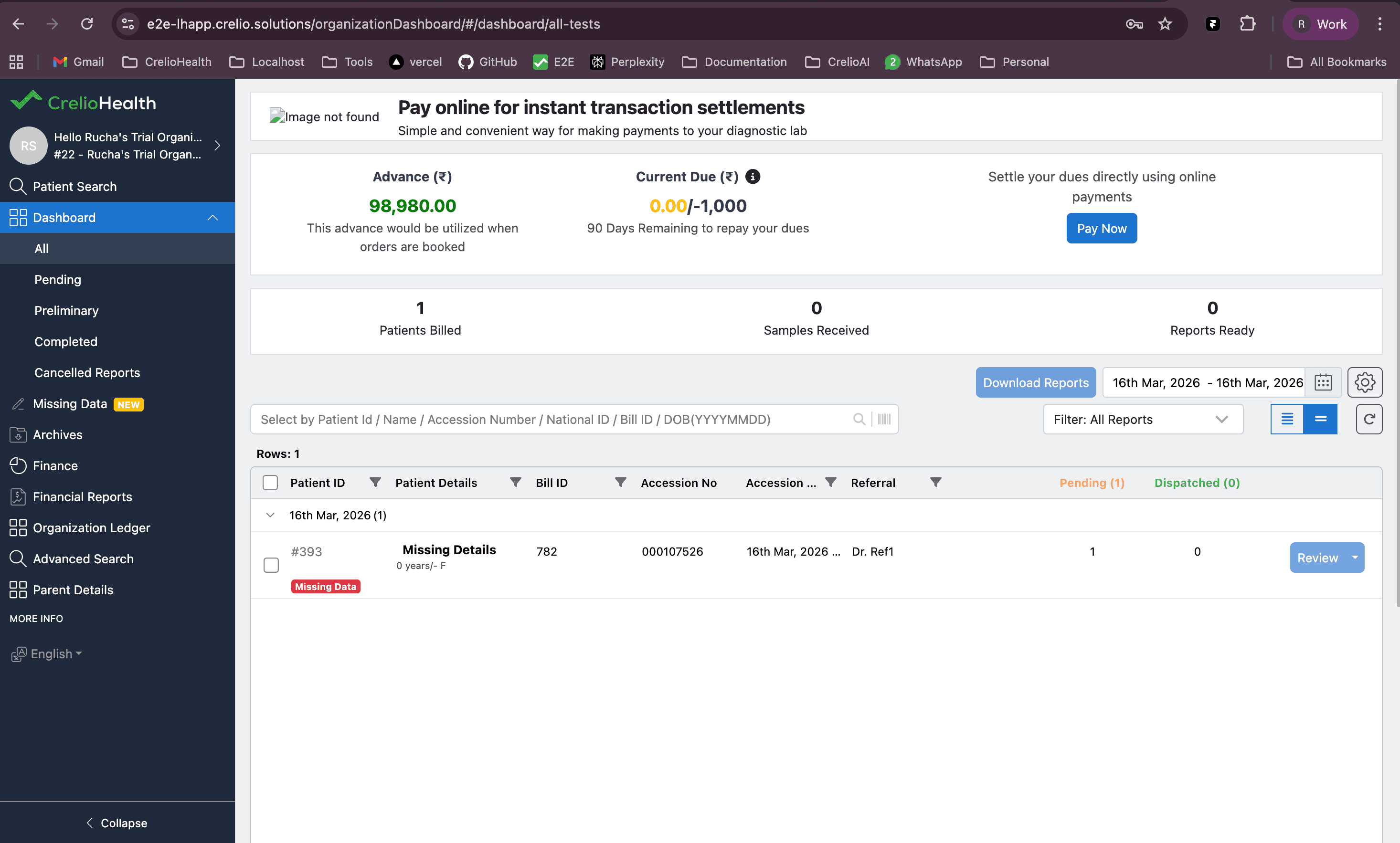
| Waiting list / report grids | Missing Data tag via has_missing_fields flags |
| Org dashboard grid | Same flag-driven badge rendering |
| Accession workflows | Unresolved clinical info fields can be loaded and resolved |
Example: Missing tag in Org / CC view
This screenshot shows how a patient registered with missing details appears in an Org/CC login, including the Missing tag on the list row.