Overview
End-to-end technical documentation for the Historical Summary feature, covering test, sample, and bill volume trend analytics for lab operations
Historical Summary
Historical Summary is a feature within the Operations Dashboard that gives labs a longitudinal view of their test, sample, and bill volumes over time. Instead of looking at a single-day snapshot ("today you processed 280 tests"), it lets ops managers ask trend-oriented questions like "How did our referral-wise test volumes shift week-over-week for the last quarter?" and get answers in a pivot-grid that they can slice by organization, referral, branch, department, or individual test.
Related JIRA / Feature References
- Feature flag:
enable_operation_summaryon thelabFeaturestable - MySQL event scheduler:
operation_summary_nightly_event - Support Dashboard: toggled under Workflow Configurations → Enable Workflows/Features
Prerequisites
| Requirement | Details |
|---|---|
| Feature flag | enable_operation_summary = 1 in labFeatures for the lab |
| MySQL event scheduler | Must be ON. The nightly aggregation job runs as a MySQL EVENT |
| billTime availability | Lab must have historical billing data; the first billTime in billing determines the start of available data |
| Timezone config | labTimeZone on the labs table must be set correctly. All date bucketing is timezone-aware |
What is it For?
Traditional operations dashboards show only the current day's activity. This works for real-time ops but fails when managers want to:
- Spot trends - Are referrals from "Apollo Hospitals" growing or declining month-over-month?
- Benchmark branches - Which branch processes the highest test volume every week?
- Audit sample access - How many samples were accessed vs. not-accessed in a given period?
- Track billing patterns - Department-wise bill counts per week, for capacity planning.
Historical Summary answers all of these by pre-aggregating operational data into a star-schema-like table (operation_historical_summary) and exposing it through a pivot grid on the frontend.
Core Concepts
Dimensions
The system uses a two-dimension model to categorize every metric:
| Dimension | Role | Examples |
|---|---|---|
| dimension_a (Primary) | The main grouping entity | Organization, Referral, Branch, Department |
| dimension_b (Secondary) | The drill-down entity within the primary group | Test ID, Sample ID |
Event Types
Each combination of primary × secondary dimension produces an event_type. Here is the full matrix:
| Primary Dimension | Test Count | Sample Count | Bill Count | Sample Accessed | Sample Not Accessed |
|---|---|---|---|---|---|
| Organization | organization_test | organization_sample | organization_bill | organization_sample_accessed | organization_sample_not_accessed |
| Referral | referral_test | referral_sample | referral_bill | referral_sample_accessed | referral_sample_not_accessed |
| Branch | branch_test | branch_sample | branch_bill | branch_sample_accessed | branch_sample_not_accessed |
| Department | department_test | N/A | N/A | N/A | N/A |
Granularity
Users can view data at three time resolutions:
| Granularity | Max Date Range | Bucketing Logic |
|---|---|---|
| Daily | 14 days | Each day = one bucket |
| Weekly | 62 days (~2 months) | 7-day intervals anchored to start_date |
| Monthly | Unlimited | First-of-month buckets (uses the stored ordered_month column) |
UI Overview
The Historical View tab lives inside the Operations Dashboard, alongside the existing Summary View and Detailed View.
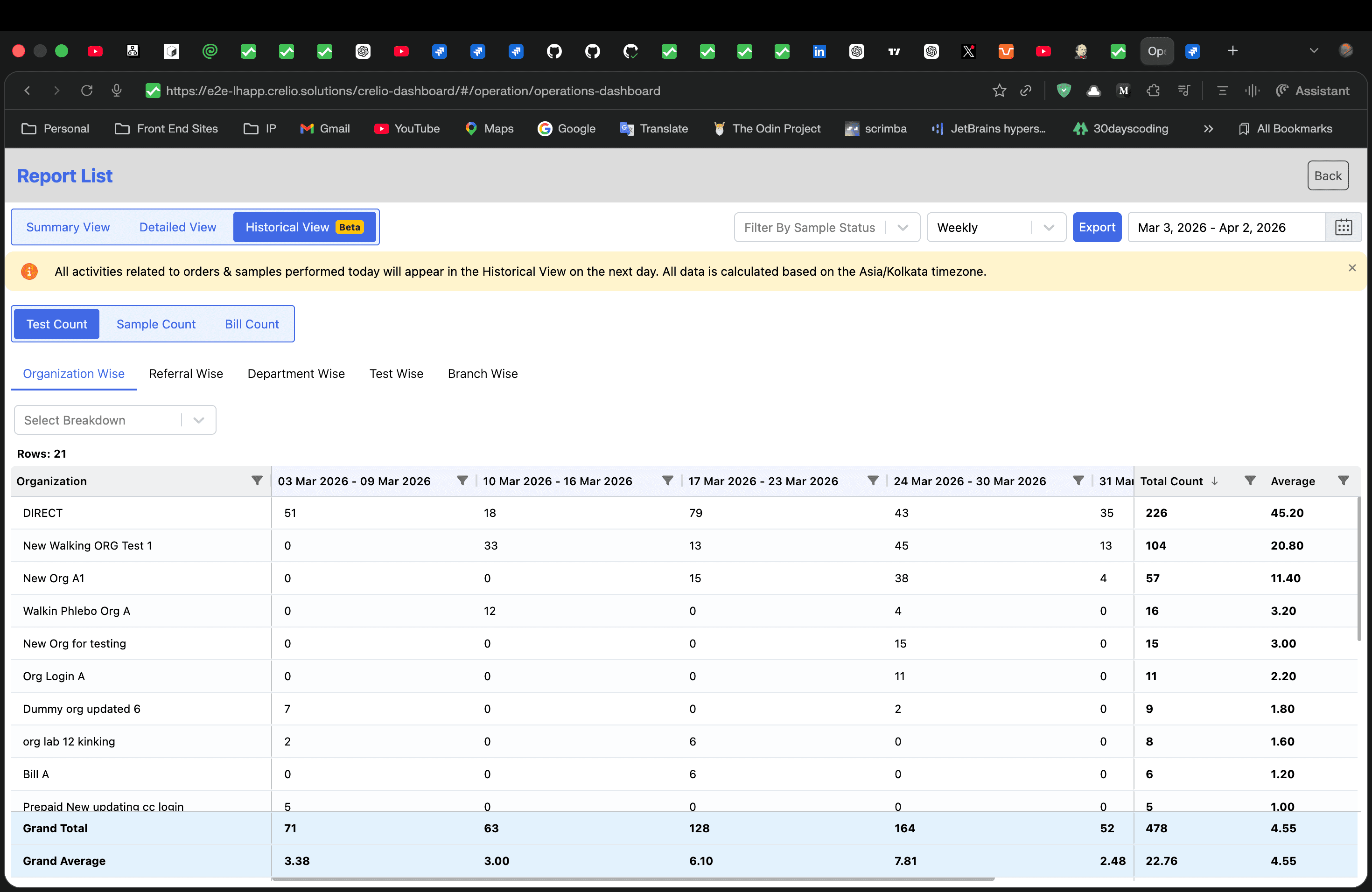
Test Count — Organization Wise (Weekly)
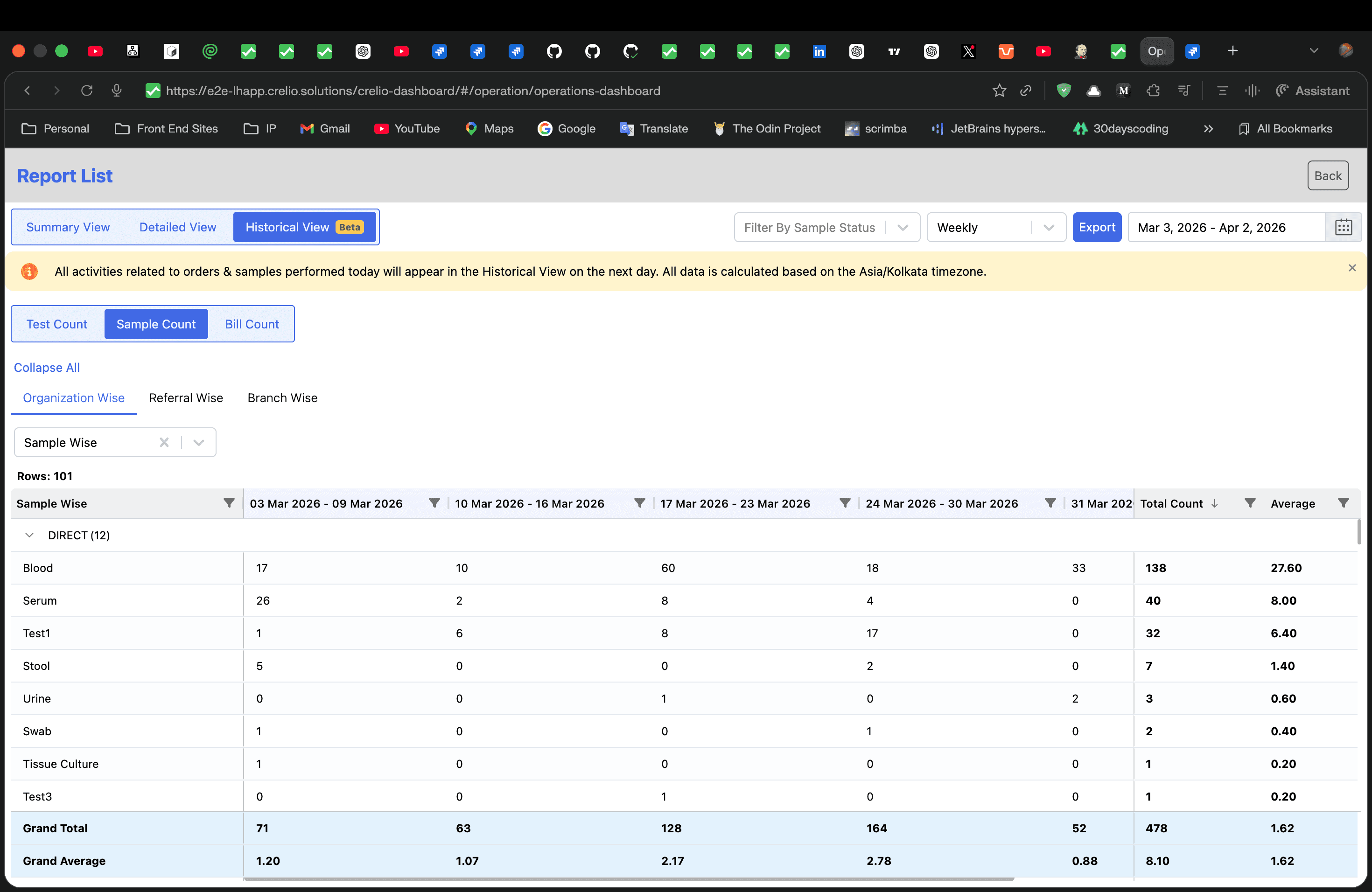
Sample Count — Organization Wise with Sample Breakdown (Weekly)
Bill Count — Organization Wise (Monthly)
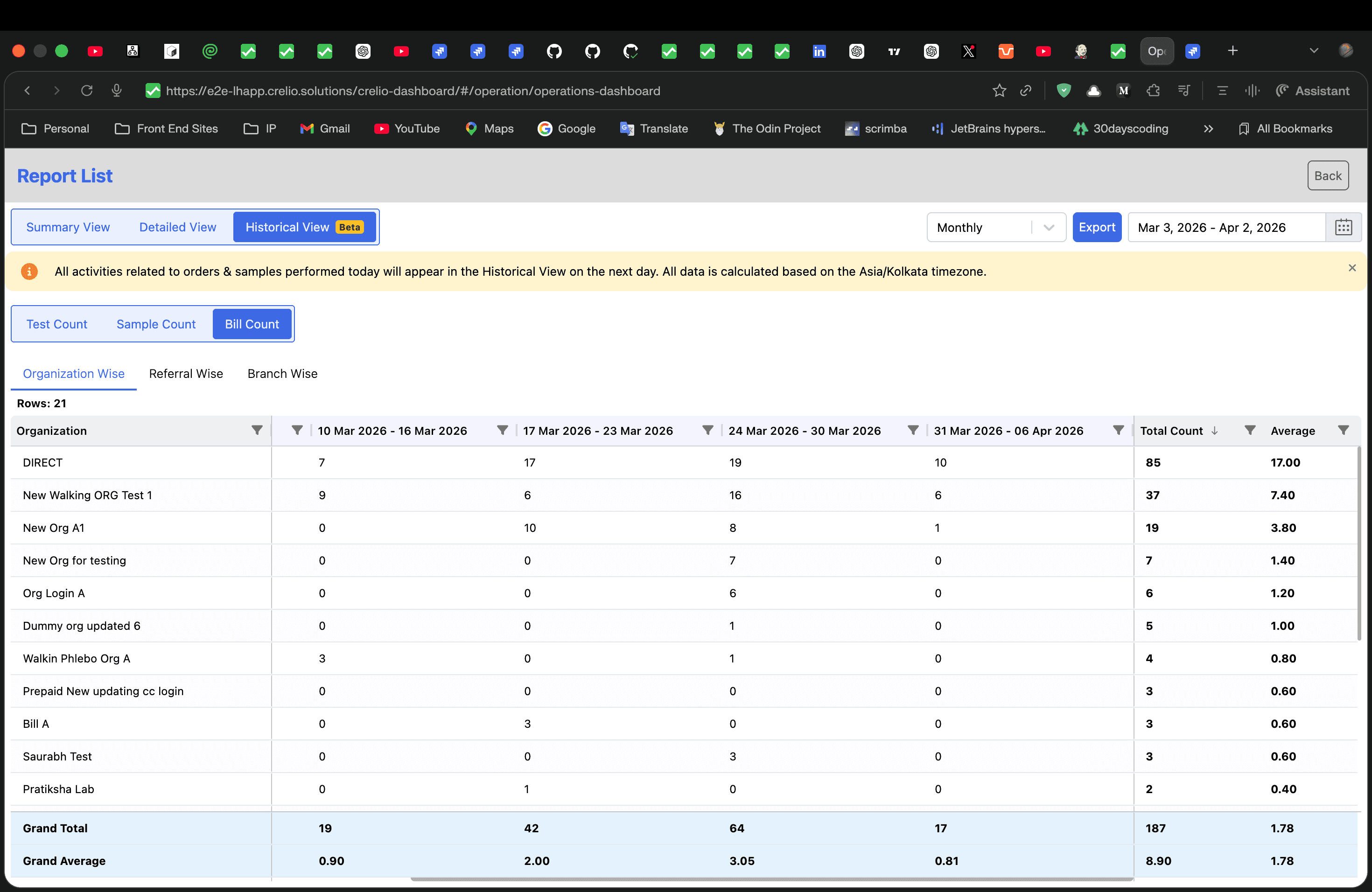
Key elements visible in the interface:
- View tabs — Summary View / Detailed View / Historical View (Beta)
- Controls — Filter By Sample Status, granularity dropdown (Weekly / Monthly), date range picker, Export button
- Count tabs — Test Count, Sample Count, Bill Count (some hidden depending on entity)
- Entity tabs — Organization Wise, Referral Wise, Department Wise, Test Wise, Branch Wise (varies by count tab)
- Breakdown selector — "Select Breakdown" / "Sample Wise" for secondary grouping
- Pivot grid — Entity names in the first column, date buckets as dynamic columns, with Grand Total and Grand Average pinned to the bottom
- Notification banner — "All activities related to orders & samples performed today will appear in the Historical View on the next day. All data is calculated based on the
{timezone}timezone."
Feature Components
Workflow Guide
How to enable via Support Dashboard, what happens behind the scenes, and what to expect
System Architecture
Database schema, triggers, nightly event scheduler, and migration procedures
Data Model
Django ORM model, SQL query builder internals, and date bucket filling logic
API Reference
REST API endpoint, request parameters, response format, and URL configuration
Frontend: UI Components
React component tree, AG Grid integration, tab system, and service layer
Design Decisions
Architectural rationale, trade-offs, and extensibility guide
Data Repair & Rebuild Queue
How to trigger data rebuilds, monitor migration progress, and run ad-hoc repairs