Eligibility Verification
Explains how insurance eligibility verification works and how the system integrates with external insurance processors.
Overview
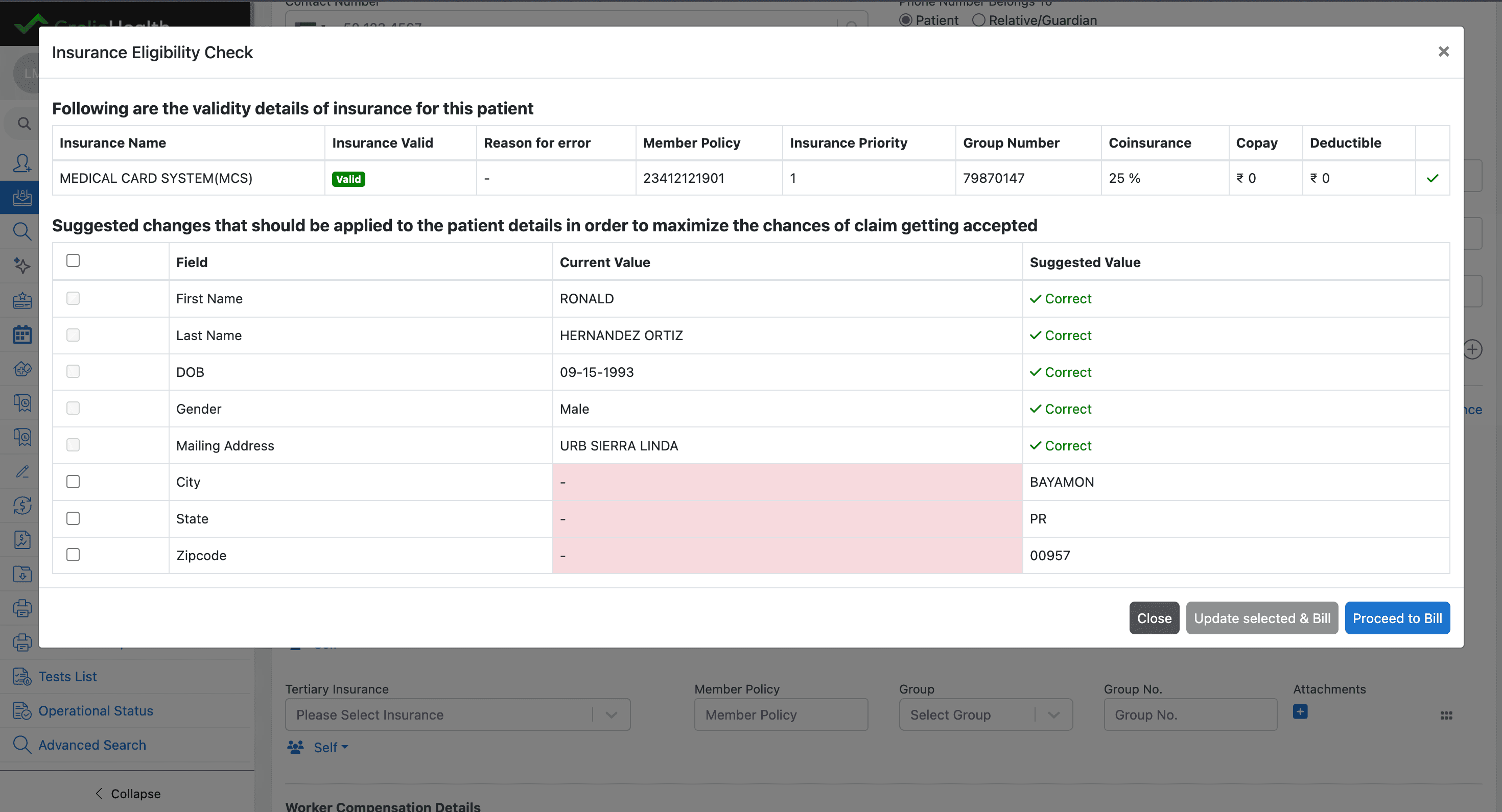
The Insurance Eligibility Verification workflow validates whether a patient’s insurance policy is active and determines the financial responsibility applicable to the patient.
Currently the eligibility verification feature is implemented for the Inmediata vendor.
Future integrations may include additional eligibility providers such as Waystar.
What the Eligibility Check Verifies
The eligibility verification process validates several aspects of the patient’s insurance information.
These include:
Insurance Validity
Confirms whether the patient’s insurance policy is active and valid for the date of service.
Coverage Details
Fetches financial responsibility information such as:
- Co-insurance percentage
- Copay amount
- Deductible details
Patient Information Validation
Verifies patient demographic and insurance-related information and compares it with the data returned by the eligibility vendor.
The system displays:
- Current values stored in LIMS
- Suggested or updated values returned by the eligibility vendor
- Ability to update patient information directly from the eligibility response to improve claim acceptance rates

Billing After Eligibility Verification
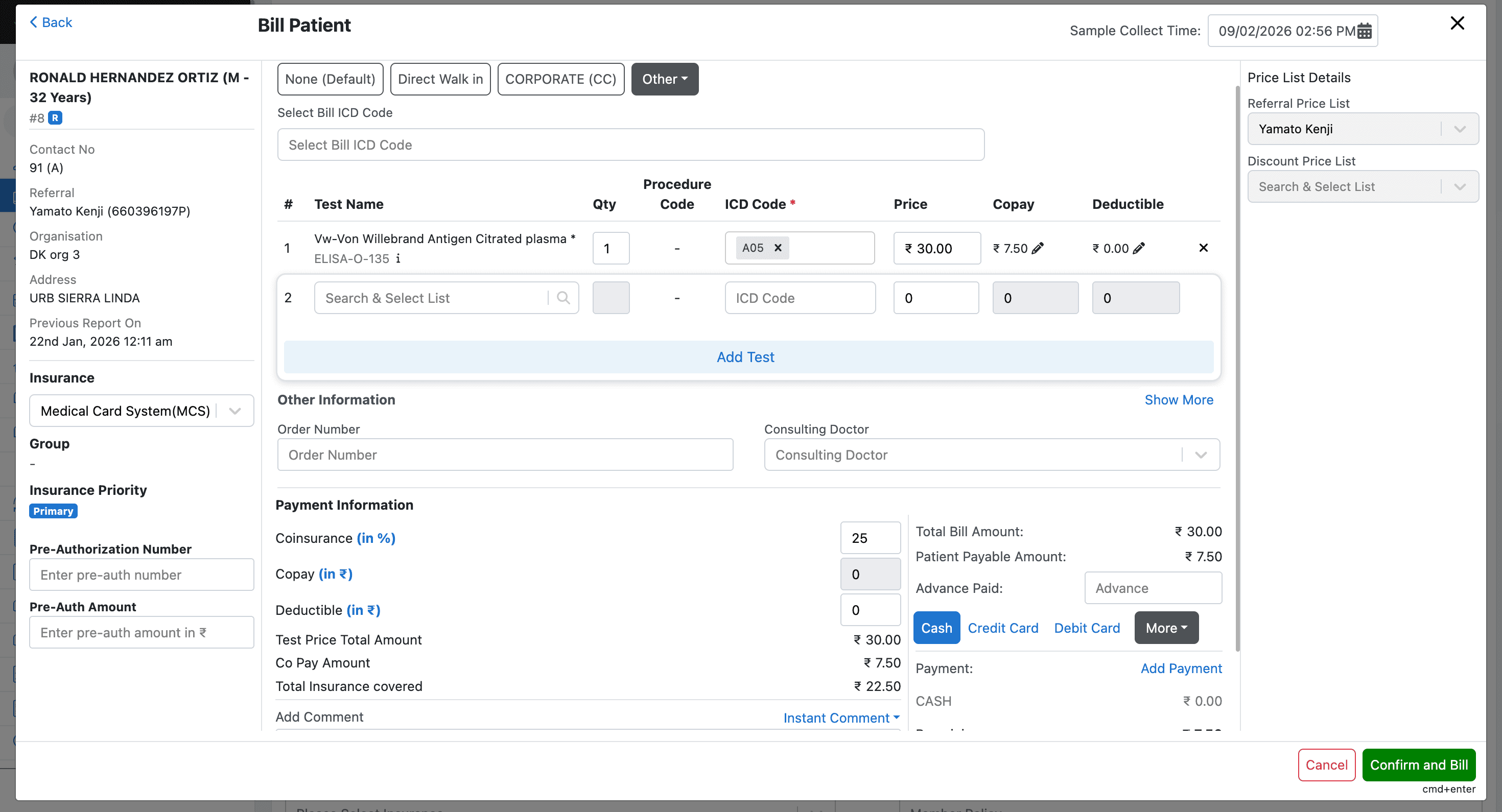
Once valid insurance details are successfully fetched, the billing process can continue using the verified information.
Billing Application
The retrieved financial responsibility values are automatically applied in the billing module.
These include:
- Co-insurance
- Copay
- Deductible
Manual Overrides
The fetched eligibility values can still be overridden in the billing modal if manual adjustments are required before finalizing the bill.
Database Changes
To store these values, the following columns have been introduced:
copay_amountdeductible_amount
These columns are available in both the billing and billingInfo tables.
Technical Requirements for Eligibility Check
To make the eligibility check work, the system requires valid patient information along with proper integration configuration.
Prerequisites
The following prerequisites must be satisfied for eligibility verification to function correctly:
- Valid patient demographic and insurance information
- Proper vendor integration setup
- Required database configuration
Required Valid Data for Integration to Work
The eligibility check will work only when the following data is present and valid:
- A referral with a valid referring doctor containing an authentic
docRegNo - A valid
group_numberininsurance_data - A valid
member_policyininsurance_data - A valid
insurance_codeininsurance_data - A valid Date of Birth in
patientRegistrationData
If any of the above information is missing or incorrect, the eligibility request may fail.
Required Database Configuration
Eligibility verification requires proper entries in the following tables:
labIntegrationdeveloperAuthantication
Reference
For a working example configuration, refer to Lab 33 on the E2E environment.
labIntegration Table Configuration
In the labIntegration table, the column integrationExtraDetails must contain vendor configuration in the following format:
{
  "sender_id": "660964025",
  "sender_code": "30",
  "receiver_id": "660610220",
  "receiver_code": "30",
  "edi_url": "https://www.inmediata.com/ws/EdiFileTransfer/",
  "username": "username",
  "password": "password",
  "auth_token": "Basic {token}=",
  "request_url": "https://www.inmediata.com/webservices/EdiTransfer/EdiFileTransfer.asmx",
  "insurance_with_group_number": ["660396197P"]
}