Billing UI Behavior with Insurance
Describes how the billing interface applies insurance price lists and calculates financial responsibility values.
Overview
When an insurance provider is selected during billing, the frontend dynamically applies the corresponding insurance price list.
The billing interface automatically updates the pricing of tests according to the selected insurance configuration.
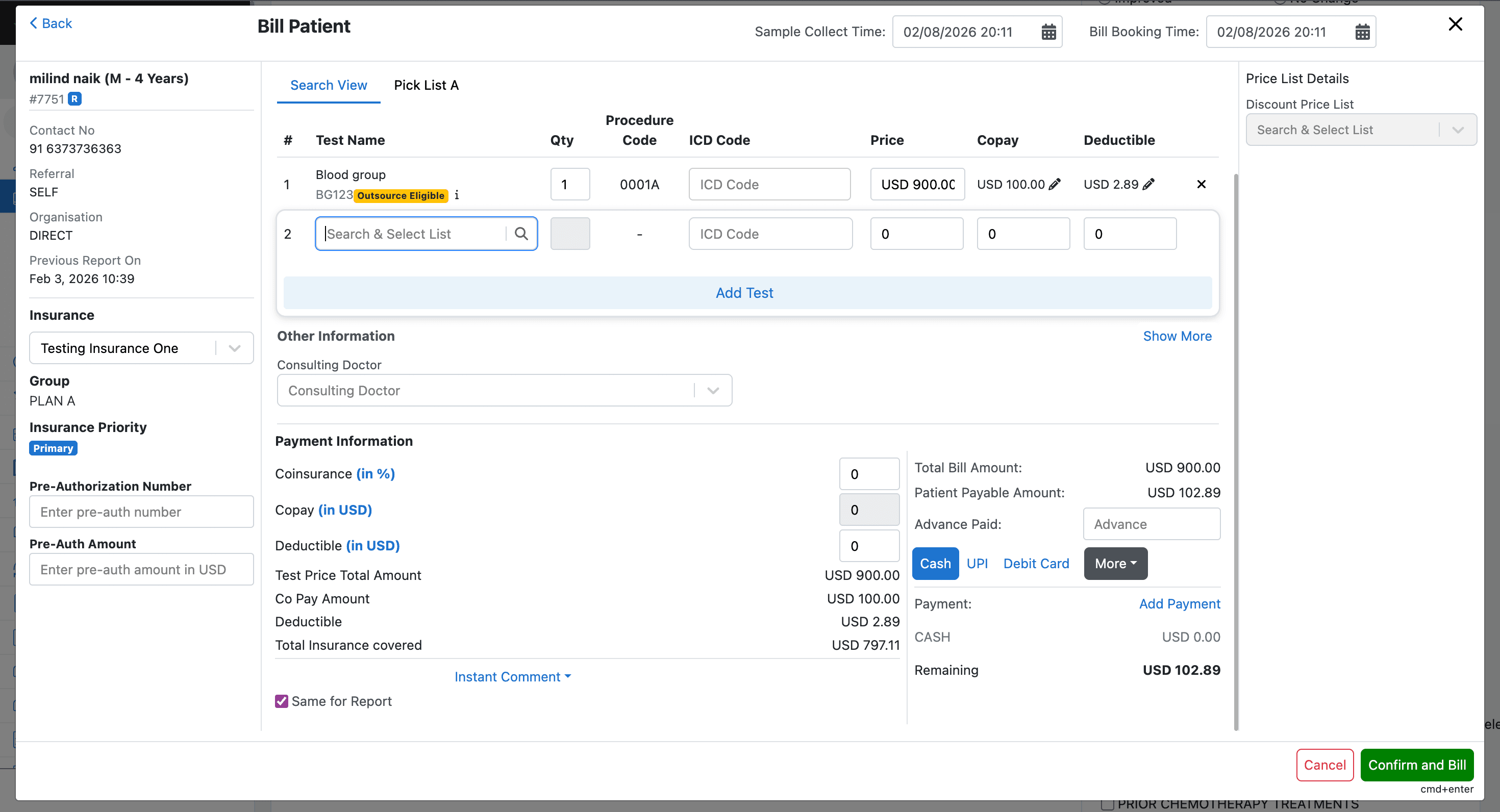
Insurance Price Application
When a test is added to the bill:
- The frontend determines the applicable insurance price list.
- The test price is replaced with the insurance price.
- Copay and deductible values are applied if configured.
Copay and Deductible Display
The UI displays patient financial responsibility values alongside each test.
Displayed values include:
- Copay
- Deductible
- Insurance covered amount
These values are automatically calculated based on insurance price list configuration.
Global Billing Inputs
The billing modal also provides fields for defining global financial responsibility values.
Supported inputs include:
- Global Copay
- Global Deductible
- Global Co-insurance
When these values are entered:
- Test-level values are overridden
- Global values are distributed across all tests
- Billing totals are recalculated in real time