Backend
Backend architecture, tables, APIs, summary-building logic, jobs, triggers, and queue processing for Antimicrobiogram.
Backend
Antimicrobiogram spans feature flags, login/session propagation, reporting models, read APIs, scheduled jobs, repair triggers, repair queue processing and migration tracking
The easiest way to understand the backend is to start from the core principle:
Antimicrobiogram is a precomputed reporting feature.
The backend does not build the matrix directly from live transactional joins on every request. Instead, it converts source report values into a dedicated summary table and then serves that table through a focused reporting API.
System design
Core tables
1. OrganismAntibioticSummary
This is the master reporting table.
It stores one denormalized row per organism-antibiotic result item that should contribute to Antimicrobiogram analytics.
The table is intentionally wide because it needs to support:
- raw result browsing
- sensitivity aggregation
- organization scoping
- patient and order context
- date-based filtering
This table is the read source for both the raw list view and the grouped sensitivity view.
2. OrganismAntibioticSummaryRepairQueue
This table is the historical repair queue.
Each row represents:
- one lab
- one date window
- one repair lifecycle
Typical statuses:
PENDINGPROCESSINGCOMPLETEDFAILED
This queue is fed in two ways:
- automatically by SQL triggers
- manually by the repair API
3. crelio_data_migrations
This table is the central tracker for scheduled backfill jobs.
For Antimicrobiogram, the relevant rows are:
migration_type = 'ANTIMICROBIOGRAM'
This table tells support and engineering:
- whether a backfill was queued
- whether it is scheduled
- whether it is running
- how long it took
4. labFeatures
The important flag is:
is_antimicrobiogram_enabled
This flag is referenced in three places:
- Support Dashboard configuration
- session payload generation
- repair trigger eligibility
Session propagation
The feature flag is exposed to the frontend during login/session setup.
The backend places is_antimicrobiogram_enabled into the session payload during login/session setup, and the React app reads that value from Redux session state.
Read API
The main read endpoint is:
GET /api-v3/report/organism-antibiotic-results/
This endpoint can return:
- raw summary rows
- grouped sensitivity rows
- or both
Important request params
organization_idresult_typereport_date_fromreport_date_tobill_time_frombill_time_tosample_typeservice_nameresponse_type
Response behavior
The view returns:
{
  "results": [...],
  "total": 123,
  "sensitivity": [...]
}
This is a very practical response shape because the frontend can use the same endpoint for raw browsing and for matrix rendering.
POST control API
The same view also exposes a control entrypoint:
POST /api-v3/report/organism-antibiotic-results/?type=...
Supported job types:
DAILYMIGRATIONREPAIRALL
This is the orchestration-friendly endpoint that lets the scheduler or an internal runner invoke the processors in a controlled way.
Manual repair API
The manual repair endpoint is:
POST /api-v3/report/organism-antibiotic-summary/repair/
This endpoint accepts a lab-local window payload such as:
{
  "start_date": "2026-04-08T00:00:00",
  "end_date": "2026-04-08T23:59:59"
}
The view:
- resolves lab id from session
- reads the lab timezone
- parses the incoming datetimes
- normalizes them
- enqueues a repair queue row
This is useful for support or engineering when a manual historical rerun is needed.
Summary-building pipeline
The core worker is:
OrganismAntibioticSummary._process_window(lab_id, start_date, end_date)This is the heart of the feature.
Step 1: Identify reports for the requested window
The processor begins by selecting labReportRelation ids where:
labId_id = lab_idbillId.billTime >= start_datebillId.billTime < end_date
This means the processing window is anchored on billing.billTime.
That is important. All three job types - daily, repair, and migration - use the same billing-date-driven window model.
Step 2: Clear old summary rows for those reports
Once the report ids are known, the processor deletes existing summary rows for the same lab/report set so the window can be rebuilt cleanly.
This is what makes the process idempotent in practice. The rebuild path does not append blindly. It replaces the affected slice.
Step 3: Load report values
The processor uses:
ReportValue.get_values(reportForId_id__in=report_ids)
This abstraction matters because report values may live across SQL-backed and document-backed storage, and ReportValue.get_values(...) already knows how to fetch them correctly.
Step 4: Keep only Antimicrobiogram-relevant component types
The allowed component types are:
microbiologyorganismantibiotic resistance
That means the feature is deliberately scoped to organism-antibiotic result content and ignores unrelated report components.
Step 5: Group report values
The values are grouped by:
(reportForId_id, profileTestId)
That grouping is helpful because one report can have multiple related component payloads that need to be processed together.
Step 6: Load related report context
The processor builds an lrr_map using select_related(...) for:
- patient
- billing
- report/test
- profile test
- organization
- lab
This gives the builder everything it needs to create a rich denormalized row.
Step 7: Prepare common fields
The method _prepare_common_fields(...) extracts the shared metadata used by both microbiology and molecular rows.
This is the shared envelope around every summary row.
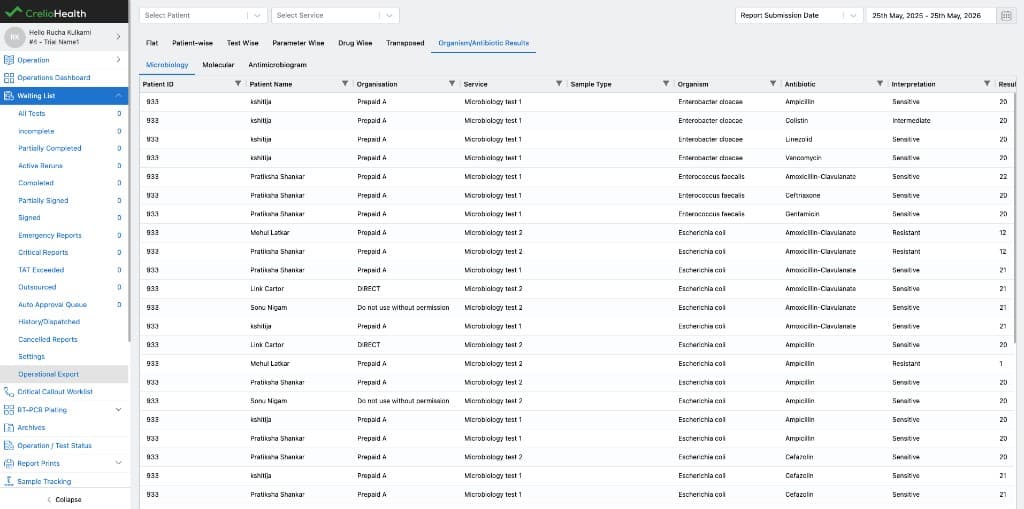
Microbiology row building
Microbiology rows come from report values where:
component_type == "microbiology"
For each item in the component value list, the builder creates one OrganismAntibioticSummary row.
Every microbiology organism-antibiotic result item becomes a directly readable summary row with all the important metadata attached.
Molecular row building
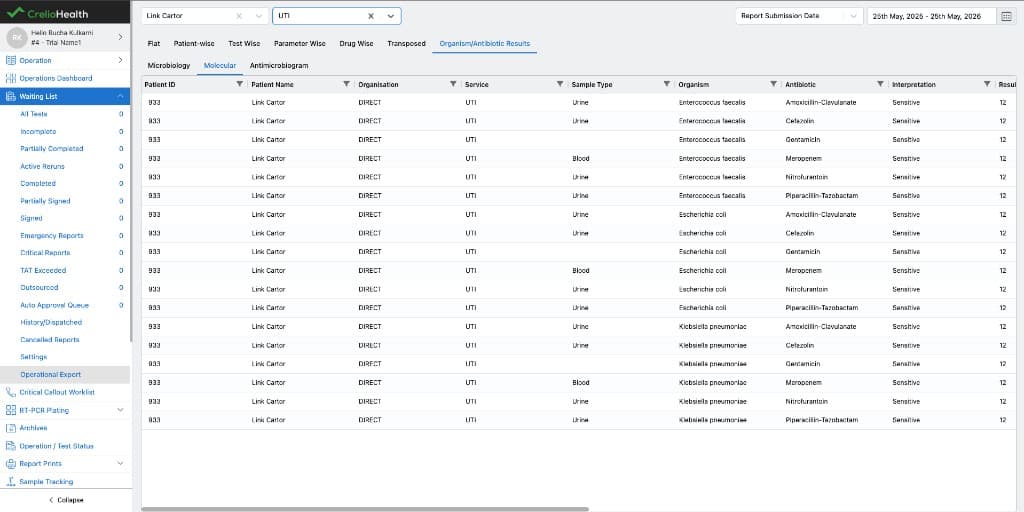
Molecular rows are built a little differently because the payload is split across:
organismcomponent valuesantibiotic resistancecomponent values
The builder:
- collects the organism list
- collects the antibiotic resistance list
- reads
organism_mappingsfrom each antibiotic resistance item - creates one summary row for each allowed organism-antibiotic pairing
This makes molecular data behave like microbiology data from the reporting layer's perspective, even though the source payload shape is different.
Sensitivity calculation
The backend calculates grouped sensitivity using:
OrganismAntibioticSummary.calculate_sensitivity(qs)
The grouping keys are:
organismorganism_categoryantibiotic
For each group, the backend computes:
total_testedsensitive_countresistant_countintermediate_countsensitivity_pctresistant_pctintermediate_pct
This grouped payload is exactly what the frontend needs to draw the heatmap.
Daily job
The daily processor is:
OrganismAntibioticSummary.run_daily_antimicrobiogram_jobs()
What it does
- fetches all labs where
is_antimicrobiogram_enabled = True - resolves each lab's previous local day
- converts that day into UTC
- calls
_process_window(...)
Why this is nice
The logic is lab-timezone aware and scales cleanly across many labs. Every enabled lab gets yesterday's slice rebuilt using its own timezone rather than a shared UTC-only calendar day.
Migration job
The migration processor is:
CrelioDataMigrations.run_scheduled_antimicrobiogram_jobs()
How rows are selected
The processor looks for:
migration_type = 'ANTIMICROBIOGRAM'is_scheduled = Truejob_status = 'Pending'
What it does
- resolves the requested processing window
- marks the row as running
- calls
_process_window(...) - updates job tracking with completion status and time taken
- removes the job from active scheduled processing once the run is complete
This is the first-load historical backfill engine for newly enabled labs.
Repair queue processor
The repair processor lives in:
OrganismAntibioticSummaryRepairQueue.process_queue(...)
Queue execution flow
- selects
PENDINGrows usingselect_for_update(skip_locked=True) - marks a row as
PROCESSING - resolves the lab timezone
- calls
_process_window(...) - marks the row as
COMPLETED
If an exception happens, the row is marked FAILED with the error message.
This is a solid queue design because it is:
- safe under concurrency
- explicit about job lifecycle
- simple to inspect operationally
Billing repair trigger
The billing-side historical repair trigger is:
trg_antimicrobiogram_billing_update
Trigger purpose
When a historical billing record changes in a way that affects Antimicrobiogram membership, the feature immediately queues a repair for that billed day.
What it checks
- lab feature flag is enabled
isCancelchanged- the affected day is not the current day
What it enqueues
It inserts a row into:
OrganismAntibioticSummaryRepairQueue
with:
start_date = affected day 00:00:00end_date = affected day 23:59:59status = 'PENDING'
If the same day is already represented in the queue, the row is reactivated through the ON DUPLICATE KEY UPDATE status = 'PENDING' pattern.
LabReportRelation repair trigger
The report-side historical repair trigger is:
trg_antimicrobiogram_lrr_update
Trigger purpose
This trigger captures report-level changes that affect the summary content or attribution of a historical day.
Watched columns
dismissedsampleRedrawFlagorgId_idreportID_idreportFormatId_idcompletedTestsisSignedisSyncedisPartialFill
What it does
- verifies the feature is enabled for the lab
- compares old and new values for the watched fields
- fetches the associated
billTimeandlabTimeZone - builds the historical one-day repair window
- ignores present-day changes because those are covered by the daily job
- writes or re-queues a
PENDINGrepair row
This is the key automation that keeps historical Antimicrobiogram data trustworthy without requiring manual intervention for every report-side change.
Why the repair model is strong
The repair model is strong because it is split correctly:
- daily job handles normal ingestion
- migration job handles first-time or large-window history
- triggers handle targeted historical corrections
That means the system can stay both fast and correct.
Debugging and verification SQL
Check feature enablement
SELECT labForId_id AS lab_id, is_antimicrobiogram_enabled
FROM labFeatures
WHERE labForId_id = ?;
Check migration rows
SELECT id, lab_id, is_scheduled, start_date, end_date, job_status, time_taken
FROM crelio_data_migrations
WHERE lab_id = ?
  AND migration_type = 'ANTIMICROBIOGRAM'
ORDER BY id DESC;
Check repair queue rows
SELECT id, lab_id, start_date, end_date, status, error_message, created_at, updated_at
FROM OrganismAntibioticSummaryRepairQueue
WHERE lab_id = ?
ORDER BY id DESC;
Check summary rows
SELECT organization_id, organization_name, organism, antibiotic, interpretation, COUNT(*) AS row_count
FROM OrganismAntibioticSummary
WHERE lab_id = ?
  AND report_date >= ?
  AND report_date < ?
GROUP BY organization_id, organization_name, organism, antibiotic, interpretation
ORDER BY organization_name, organism, antibiotic;
Short mental model for backend engineers
If you want the shortest accurate backend model, use this:
- enablement sets the lab feature and queues migration
- migration loads history
- daily job loads yesterday
- triggers queue historical day repairs
- repair processor rebuilds those days
- reads come from
OrganismAntibioticSummary - sensitivity is grouped at read time from the summary rows
That is the backend in one chain.