Workflow Guide
Step-by-step guide for enabling, configuring, and navigating through the SPA architecture.
Workflow Guide
This section provides a practical walkthrough for enabling, configuring, and working with the SPA — covering both operator-facing behavior and developer-facing setup.
How To Enable SPA For A Lab
Via Redis CLI (Direct)
The simplest way to enable SPA for a lab:
# Enable SPA for lab 12345
redis-cli SET is_spa_enabled_12345 True

# Verify the flag
redis-cli GET is_spa_enabled_12345
The change takes effect on the next login for that lab. No deployment or restart required.
Via Account Creation (Automatic)
New labs created through the self-serve account creation flow have the SPA flag set automatically:
Source: selfserved/account_creation/account.py
Via Support Dashboard
Support staff can toggle the flag through the support admin interface:
- Open the Support Dashboard → navigate to the lab's Centre Details.
- Go to the Configurations tab → Workflow Configurations.
- Under Enable Workflows/Features → Features, find the Enable SPA toggle.
- Toggle it on to enable, off to disable.
This wraps the Redis operation in a logged action for traceability.
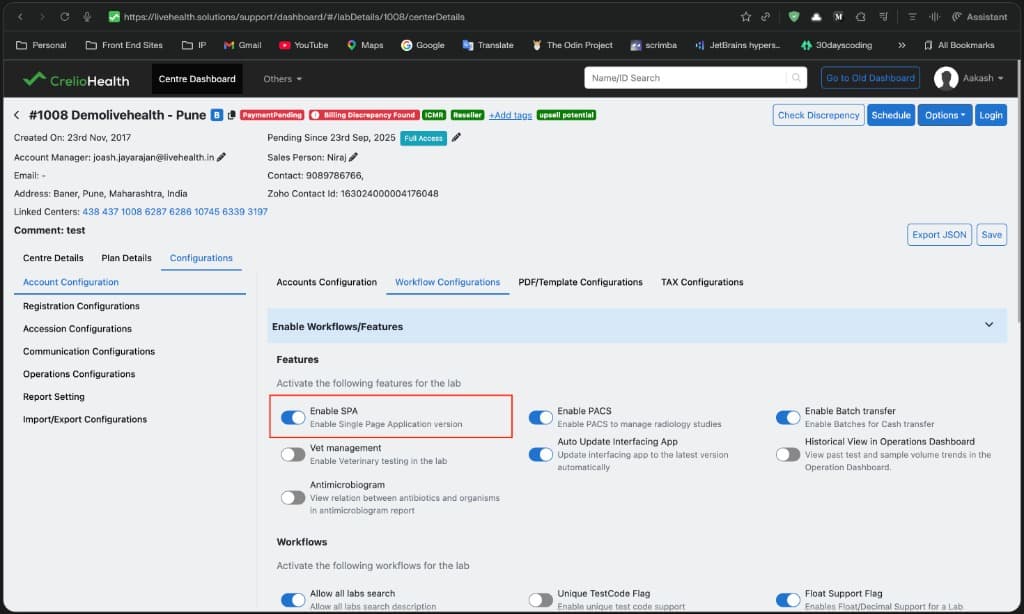
What Happens After Enabling
- User logs in → Django checks
is_spa_enabled(lab_id)via Redis. - If
True, the session'sloginURLis set to/crelio-dashboard/#/{module-path}. - Browser is redirected to
/crelio-dashboard/. CrelioDashboardViewservescrelio-dashboard.html.- React bootstraps once — all providers, session, and settings initialized.
- User sees the unified sidebar with module switcher.
Bulk Enable For Multiple Labs (Django Shell)
To enable SPA for multiple labs at once, use the Django shell:
from django.core.cache import cache

lab_ids = [1134, 3042, 3333, 6284, 7493, 7726, 8440, 8774, 8968, 9354, 9448, 9573, 10446, 11802]

[cache.set("is_spa_enabled_{lab_id}".format(lab_id=lab_id), True) for lab_id in lab_ids]
This sets the is_spa_enabled_{lab_id} Redis key to True for each lab in the list. The change takes effect on the next login for each lab.
To bulk disable:
from django.core.cache import cache

lab_ids = [1134, 3042, 3333]

[cache.delete("is_spa_enabled_{lab_id}".format(lab_id=lab_id)) for lab_id in lab_ids]
How To Disable SPA For A Lab
Via Redis CLI (Direct)
# Disable SPA for lab 12345 — delete the key
redis-cli DEL is_spa_enabled_12345

# Or set to False explicitly
redis-cli SET is_spa_enabled_12345 False
The change takes effect on the next login. Active sessions continue using the SPA until the user logs out and back in.
Via Support Dashboard
Use the same toggle shown in the enable section above:
- Open the Support Dashboard → navigate to the lab's Centre Details.
- Go to the Configurations tab → Workflow Configurations.
- Under Enable Workflows/Features → Features, find the Enable SPA toggle.
- Toggle it off to disable SPA for the lab.
Bulk Disable For Multiple Labs (Django Shell)
from django.core.cache import cache

lab_ids = [1134, 3042, 3333]

[cache.delete("is_spa_enabled_{lab_id}".format(lab_id=lab_id)) for lab_id in lab_ids]
Rollback scenario
If the SPA causes issues for a specific lab:
- Disable the Redis flag immediately (no deployment needed).
- Ask the user to log out and log back in.
- They will now receive the legacy per-module builds.
This provides an instant rollback path without code changes or deployments.
How To Configure
Adding A New Module To The SPA
| Step | What To Do | Where |
|---|---|---|
| 1 | Create useXxxRoutes() hook returning CrelioRouteType[] | src/modules/CrelioDashboard/RoutesAndMenus/xxxRoutesAndMenu.tsx |
| 2 | Create useXxxSidebarMenu() hook returning CrelioSidebarItem[] | Same file |
| 3 | Register both hooks in the modules array | RoutesAndMenus/routes.tsx |
| 4 | Add legacy URL → SPA URL mapping | SPA_URL_MAPPER in livehealth_4/decorators/utils.py |
| 5 | Update Django login flow to redirect to SPA URL when is_spa_enabled | logins/utils/session_helpers.py |
Adding A New Route To An Existing Module
Add a CrelioRoute entry in the module's *RoutesAndMenu file. No backend changes needed — hash routing means Django doesn't need to know about new frontend routes.
// Example: adding a new route to Operations
{ path: "/operation/new-feature", Component: NewFeatureComponent }
Adding A New Sidebar Item
Add a CrelioSidebarItem entry in the module's useXxxSidebarMenu() hook:
{ name: t("New Feature"), icon: "fa-star", route: "/operation/new-feature" }Navigating Through The SPA Workflow
Login → SPA Bootstrap → Module Navigation
Module Switching
Once the SPA is bootstrapped:
- User clicks a module in the sidebar module switcher dropdown.
- The URL hash changes (e.g.,
/crelio-dashboard/#/finance/dashboard). matchingModuleresolves the active module from the URL.- The sidebar renders the new module's menu items.
- The
Switchrenders the new module's routes. - No network request, no re-initialization, no state loss.
Spotlight Search
Press Cmd+K (Mac) or Ctrl+K (Windows) to open the cross-module spotlight search. Results are scoped to the current module context but enable cross-module navigation.
Running Locally
Dev Server Setup
# 1. Start the SPA dev server (port 3000)
cd apps/livehealth-frontend
yarn start local.crelioDashboard

# 2. Start the Django backend (port 8000) — in a separate terminal
cd livehealthapp
python manage.py runserver 0.0.0.0:8000

# 3. Start the Py3 backend (port 9000) — in a separate terminal
cd crelioapp
python manage.py runserver 0.0.0.0:9000
Proxy Configuration
The dev server automatically proxies API calls:
| API Prefix | Proxy Target | Source |
|---|---|---|
| Default (no prefix) | http://0.0.0.0:8000 (Py2) | package.json proxy field |
/api-v3/ | http://0.0.0.0:9000 (Py3) | src/setupProxy.js |
Building For Production
# SPA production build
nps build.CrelioDashboardProd

# All modules (legacy) production build
nps build.allProd

# Move assets to Django static directory
bash move-assets.sh CrelioDashboard  # SPA
bash move-assets.sh dashboard        # Legacy
Where SPA Behavior Is Visible To The User
| Screen | What shows up |
|---|---|
| Login redirect | User lands on /crelio-dashboard/#/{module} instead of /waitingList/ or /billing/ |
| Module switching | Clicking a different module in the sidebar is instant — no page reload |
| Sidebar | Unified sidebar with module switcher dropdown at the top |
| URL pattern | URLs contain /#/ hash fragment (e.g., /crelio-dashboard/#/finance/dashboard) |
| Browser back/forward | Navigates between previously visited modules without reload |
| Spotlight search | Cmd+K opens cross-module search |